


Page 158 - Handout Computer Network.
P. 158
You  can  easily  determine  the  IP  address  of  your  local  DNS  server  by  accessing
                            network status windows in Windows or UNIX.

                            A host’s local DNS server is typically “close to” the host. For an institutional ISP, the
                            local DNS server may be on the same LAN as the host; for a residential ISP, it is
                            typically separated from the host by no more than a few routers.
                            When a host makes a DNS query, the query is sent to the local DNS server, which
                            acts a proxy, forwarding the query into the DNS server hierarchy, as we’ll discuss in
                            more detail below.
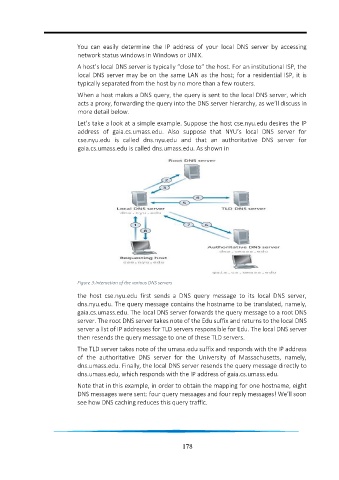
                            Let’s take a look at a simple example. Suppose the host cse.nyu.edu desires the IP
                            address  of  gaia.cs.umass.edu.  Also  suppose  that  NYU’s  local  DNS  server  for
                            cse.nyu.edu  is  called  dns.nyu.edu  and  that  an  authoritative  DNS  server  for
                            gaia.cs.umass.edu is called dns.umass.edu. As shown in


                            Figure 3:Interaction of the various DNS servers
                            the  host  cse.nyu.edu  first  sends  a  DNS  query  message  to  its  local  DNS  server,
                            dns.nyu.edu. The query message contains the hostname to be translated, namely,
                            gaia.cs.umass.edu. The local DNS server forwards the query message to a root DNS
                            server. The root DNS server takes note of the Edu suffix and returns to the local DNS
                            server a list of IP addresses for TLD servers responsible for Edu. The local DNS server
                            then resends the query message to one of these TLD servers.

                            The TLD server takes note of the umass.edu suffix and responds with the IP address
                            of  the  authoritative  DNS  server  for  the  University  of  Massachusetts,  namely,
                            dns.umass.edu. Finally, the local DNS server resends the query message directly to
                            dns.umass.edu, which responds with the IP address of gaia.cs.umass.edu.

                            Note that in this example, in order to obtain the mapping for one hostname, eight
                            DNS messages were sent: four query messages and four reply messages! We’ll soon
                            see how DNS caching reduces this query traffic.


                                                                 178

