


Page 183 - Computer Graphics Handout
P. 183
Note that we could have used the mouse buttons to move the viewer. We could use the mouse buttons to move the user forward
          or to turn her right or left (see Exercise 4.14).  However, by using the keyboard for moving the viewer, we can use the mouse to
          move the object as with the rotating cube in Chapter 3. In this example, we are using direct positioning of the camera through Look
          At. There are other possibilities. One is to use rotation and translation matrices to alter the model-view matrix incrementally. If we
          want to move the viewer through the scene without having her looking at a fixed point, this option may be more appealing. We
          could also keep a position variable in the program and change it as the viewer moves. In this case, the model-view matrix would be
          computed from scratch rather than changed incrementally. Which option we choose depends on the particular application, and
          often on other factors as well, such as the possibility that numerical errors might accumulate if we were to change the model-view
          matrix incrementally many times.
          The basic mesh rendering can be extended in many ways. In Chapter 5, we will learn to add lights and surface properties to create
          a more realistic image; in Chapter 7, we will learn to add a texture to the surface. The texture map might be an image of the terrain
          from a photograph or other data that might be obtained by digitization of a map. If we combine these techniques, we can generate
          a display in which we can make the image depend on the time of day by changing the position of the light source. It is also possible
          to obtain smoother surfaces by using the data to define a smoother surface with the aid of one of the surface types that we will
          introduce in Chapter 10.


          4.10 PROJECTIONS AND SHADOWS


          The creation of simple shadows is an interesting application of projection matrices. Although shadows are not geometric objects,
          they are important components of realistic images and give many visual clues to the spatial relationships among the objects in a
          scene. Starting from a physical point of view, shadows require a light source to be present. A point is in shadow if it is not illuminated
          by any light source or, equivalently, if a viewer at that point cannot see any light sources. However, if the only light source is at the
          center of projection, there are no visible shadows, because any shadows are behind visible objects. This lighting strategy has been
          called the“flashlight in the eye” model and corresponds to the simple lighting we have used thus far.
          To add physically correct shadows, we must understand the interaction between light and materials, a topic that we investigate in
          Chapter 5. There we show that global calculations are difficult; normally, they cannot be done in real time. Nevertheless, the
          importance of shadows in applications such as flight simulators led to a number of special approaches that can be used in many
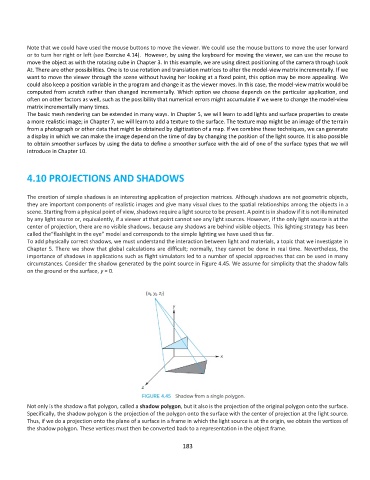
          circumstances. Consider the shadow generated by the point source in Figure 4.45. We assume for simplicity that the shadow falls
          on the ground or the surface, y = 0.


          Not only is the shadow a flat polygon, called a shadow polygon, but it also is the projection of the original polygon onto the surface.
          Specifically, the shadow polygon is the projection of the polygon onto the surface with the center of projection at the light source.
          Thus, if we do a projection onto the plane of a surface in a frame in which the light source is at the origin, we obtain the vertices of
          the shadow polygon. These vertices must then be converted back to a representation in the object frame.

                                                             183

