


Page 180 - Computer Graphics Handout
P. 180
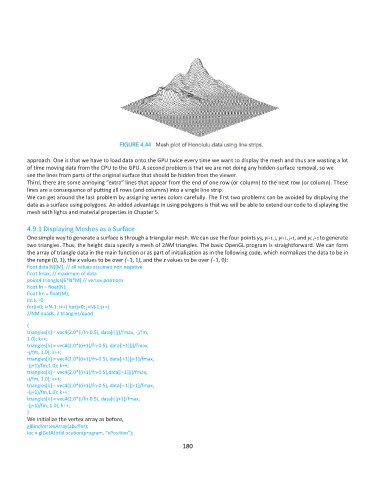
approach. One is that we have to load data onto the GPU twice every time we want to display the mesh and thus are wasting a lot
          of time moving data from the CPU to the GPU. A second problem is that we are not doing any hidden-surface removal, so we
          see the lines from parts of the original surface that should be hidden from the viewer.
          Third, there are some annoying “extra” lines that appear from the end of one row (or column) to the next row (or column). These
          lines are a consequence of putting all rows (and columns) into a single line strip.
          We can get around the last problem by assigning vertex colors carefully. The first two problems can be avoided by displaying the
          data as a surface using polygons. An added advantage in using polygons is that we will be able to extend our code to displaying the
          mesh with lights and material properties in Chapter 5.

          4.9.1 Displaying Meshes as a Surface
          One simple way to generate a surface is through a triangular mesh. We can use the four points yij, yi+1, j, yi+1, j+1, and yi, j+1 to generate
          two triangles. Thus, the height data specify a mesh of 2NM triangles. The basic OpenGL program is straightforward. We can form
          the array of triangle data in the main function or as part of initialization as in the following code, which normalizes the data to be in
          the range (0, 1), the x values to be over (−1, 1), and the z values to be over (−1, 0):
          float data[N][M]; // all values assumed non negative
          float fmax; // maximum of data
          point4 triangles[6*N*M] // vertex positions
          float fn = float(N);
          float fm = float(M);
          int k =0;
          for(i=0; i<N-1; i++) for(j=0; j<M-1;j++)
          //NM quads, 2 triangles/quad

          {
          triangles[k] = vec4(2.0*(i/fn-0.5), data[i][j]/fmax, -j/fm,
          1.0); k++;
          triangles[k] = vec4(2.0*((i+1)/fn-0.5), data[i+1][j]/fmax,
          -j/fm, 1.0); k++;
          triangles[k] = vec4(2.0*((i+1)/fn-0.5), data[i+1][j+1]/fmax,
          -(j+1)/fm,1.0); k++;
          triangles[k] = vec4(2.0*((i+1)/fn-0.5),data[i+1][j]/fmax,
          -j/fm, 1.0); k++;
          triangles[k] = vec4(2.0*((i+1)/fn-0.5), data[i+1][j+1]/fmax,
          -(j+1)/fm,1.0); k++;
          triangles[k] = vec4(2.0*(i/fn-0.5), data[i][j+1]/fmax,
          -(j+1)/fm, 1.0); k++;
          }
          We initialize the vertex array as before,
          glBindVertexArray(abuffer);
          loc = glGetAttribLocation(program, “vPosition”);
                                                             180

