


Page 1096 - 2006 HARLEY FLSTCI SERVICE MANUAL
P. 1096
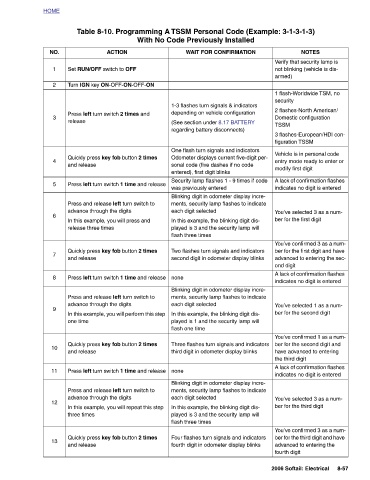
Verify that security lamp is  not blinking (vehicle is dis-  armed)  1 flash-Worldwide TSM, no   security  2 flashes-North American/ Domestic configuration   TSSM  figuration TSSM  Vehicle is in personal code   modify first digit  indicates no digit is entered  ber for the first digit  ond digit  indicates no digit is entered  ber for the second digit  ber for the second digit and  have advanced to entering   the third digit  indicates no digit is entered  ber for the third digit  advanced to entering the   fourth digit  2006 Softail: Electrical


                        NOTES                      3 flashes-European/HDI con-  entry mode ready to enter or   A lack of confirmation flashes   You’ve selected 3 as a num-  You’ve confirmed 3 as a num- ber for the first digit and have  advanced to entering the sec-  A lack of confirmation flashes   You’ve selected 1 as a num-  You’ve confirmed 1 as a num-  A lack of confirmation flashes   You’ve selected 3 as a num-  You’ve confirmed 3 as a num- ber for the third digit and have   8-57
                 Table 8-10. Programming A TSSM Personal Code (Example: 3-1-3-1-3)


                    With No Code Previously Installed
                        WAIT FOR CONFIRMATION  1-3 flashes turn signals & indicators  depending on vehicle configuration (See section under 8.17 BATTERY  regarding battery disconnects)  One flash turn signals and indicators Odometer displays current five-digit per- sonal code (five dashes if no code  entered), first digit blinks Security lamp flashes 1 - 9 times if code  was previously entered Blinking digit in odometer display incre- ments, security lamp flashes to indicate   each digit selected In this example, the blinking digit dis- played is 3 and the security lamp will   flash three times  Two flashes turn signals and indicators second digit in odometer display blin


                             Set RUN/OFF switch to OFF  Press left turn switch 2 times and   and release  advance through the digits In this example, you will press and   release three times  and release  advance through the digits  one time  and release  advance through the digits  three times  and release
                        ACTION     Turn IGN key ON-OFF-ON-OFF-ON  Quickly press key fob button 2 times   Press left turn switch 1 time and release  Press and release left turn switch to   Quickly press key fob button 2 times   Press left turn switch 1 time and release  Press and release left turn switch to   In this example, you will perform this step   Quickly press key fob button 2 times   Press left turn switch 1 time and release  Press and release left turn switch to   In this example, you will repeat this step   Quickly press key fob button 2 times


          HOME          NO.  1     2         3  release     4      5          6            7      8          9           10      11        12           13

