


Page 1092 - 2006 HARLEY FLSTCI SERVICE MANUAL
P. 1092
TSSM must be  NOTES         TSM/TSSM enables starter   Password has not been  learned. ICM sets DTC   ECM/ICM enters Password  Learning mode for ten min- utes. Do not cycle ignition  switch or interrupt vehicle  power or Password Learn will   be unsuccessful.  This takes ten minutes  ECM/ICM must not be   allowed to shutdown.  This takes ten minutes.  ECM/ICM must not be   allowed to shutdown.  This takes ten minutes.  ECM/ICM must not be   allowed to shutdown.  8-53 2006 Softail: Electrical

              been replaced by a TSM, password learn is necessary.


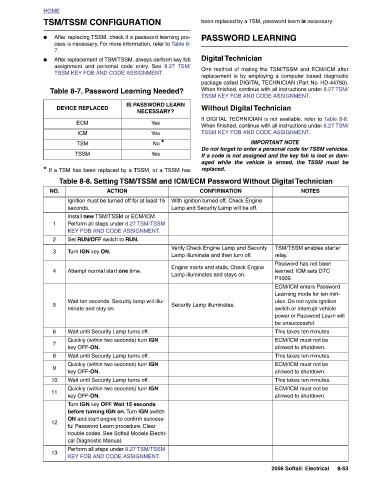
                   PASSWORD LEARNING  Digital Technician One method of mating the TSM/TSSM and ECM/ICM after replacement is by employing a computer based diagnostic package called DIGITAL TECHNICIAN (Part No. HD-44750). When finished, continue with all instructions under 8.27 TSM/ TSSM KEY FOB AND CODE ASSIGNMENT. Without Digital Technician If DIGITAL TECHNICIAN is not available, refer to Table 8-8. When finished, continue with all instructions under 8.27 TSM/ TSSM KEY FOB AND CODE ASSIGNMENT.  IMPORTANT NOTE Do not forget to enter a personal code for TSSM vehicles. If a code is not assigned and the key fob is lost or dam- aged while the vehicle is armed, the   repl


                                                               After replacing TSSM, check if a password learning pro- cess is necessary. For more information, refer to Table 8- After replacement of TSM/TSSM, always perform key fob  8.27 TSM/  Table 8-7. Password Learning Needed?  IS PASSWORD LEARN   NECESSARY?  Yes  Yes  No *  Yes * If a TSM has been replaced by a TSSM, or a TSSM has  ACTION Ignition must be turned off for at least 15   Install new TSM/TSSM or ECM/ICM.  Perform all steps under 8.27 TSM/TSSM  KEY FOB AND CODE ASSIGNMENT.  Wait ten seconds. Security lamp will illu-  Quickly (within two seconds) turn IGN   Quickly (within two seconds) turn IGN   Qui


                               TSSM KEY FOB AND CODE ASSIGNMENT.
                            assignment and personal code entry. See
              TSM/TSSM CONFIGURATION


                                          DEVICE REPLACED  ECM  ICM  TSM  TSSM  seconds.  Set RUN/OFF switch to RUN.  Turn IGN key ON.  Attempt normal start one time.  minate and stay on.  Wait until Security Lamp turns off.  key OFF-ON. Wait until Security Lamp turns off.  key OFF-ON. Wait until Security Lamp turns off.  key OFF-ON.  cal Diagnostic Manual.


          HOME     ●   7.  ●                                          NO.       1     2   3     4          5        6   7   8   9   10   11       12        13

