


Page 17 - APPS-4797 HTC Corporation Taiwan HTC Watermark Solution Implement Guide
P. 17
Configuring Watermark Related User Groups in Site

               Collection


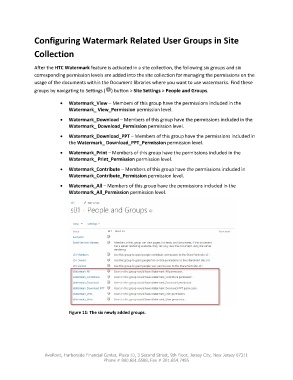
               After the HTC Watermark feature is activated in a site collection, the following six groups and six
               corresponding permission levels are added into the site collection for managing the permissions on the
               usage of the documents within the Document libraries where you want to use watermarks. Find these

               groups by navigating to Settings (  ) button > Site Settings > People and Groups.

                          •  Watermark_View – Members of this group have the permissions included in the
                              Watermark_ View_Permission permission level.
                          •  Watermark_Download – Members of this group have the permissions included in the
                              Watermark_ Download_Permission permission level.
                          •  Watermark_Download_PPT – Members of this group have the permissions included in
                              the Watermark_ Download_PPT_Permission permission level.

                          •  Watermark_Print – Members of this group have the permissions included in the
                              Watermark_ Print_Permission permission level.

                          •  Watermark_Contribute – Members of this group have the permissions included in
                              Watermark_Contribute_Permission permission level.
                          •  Watermark_All – Members of this group have the permissions included in the
                              Watermark_All_Permission permission level.


                              Figure 11: The six newly added groups.


                    AvePoint, Harborside Financial Center, Plaza 10, 3 Second Street, 9th Floor, Jersey City, New Jersey 07311
                                            Phone # 800.661.6588, Fax # 201.654.7485

