


Page 208 - JoFA_2022
P. 208
TECHNOLOGY Q&A


         MICROSOFT EXCEL
         Create your own custom Excel functions with LAMBDA


         Q. There are     A. I love all things Excel, but the LAMBDA func-  2.  Create the LAMBDA in the spreadsheet.
         formulas that I   tion is one I am most excited about. It allows you   3.  Define the LAMBDA in the Name Manager.
         am repeatedly    to build your own custom functions. LAMBDA is a   The LAMBDA function requires that you define
         having to create   relatively new function for users of Excel 365 and   a parameter or a calculation. The parameter(s) are
         in my Excel      Excel for the web.                        optional and can be used in the calculation. The
         workbook, and      So, why would you want to spend your valuable   calculation is required, and it must be listed as the
         there are no     time creating a custom function? One of the prin-  last argument. I think this becomes much clearer
         built-in functions   ciples of working smart is to automate tasks where   with an example.
         in Excel that    possible. If you are routinely creating formulas that   Note that the content that follows is based on
         can do these     accomplish the same purpose, spending a little extra   Microsoft Excel 365 for PCs. Other versions of
         calculations. Is   time upfront to create a function that can be reused   Excel may work differently.
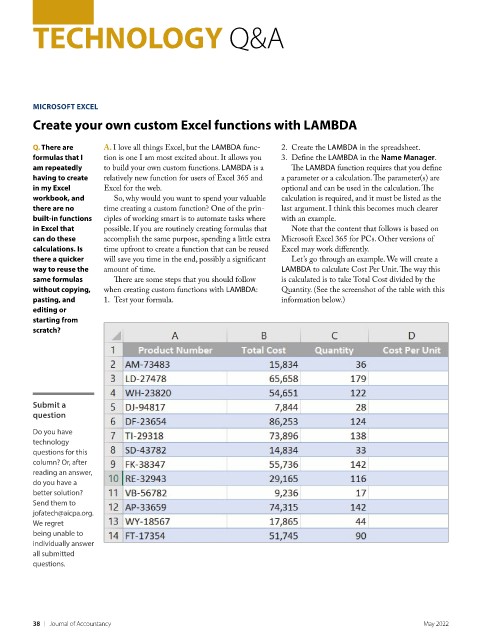
         there a quicker   will save you time in the end, possibly a significant   Let’s go through an example. We will create a
         way to reuse the   amount of time.                         LAMBDA to calculate Cost Per Unit. The way this
         same formulas      There are some steps that you should follow   is calculated is to take Total Cost divided by the
         without copying,   when creating custom functions with LAMBDA:  Quantity. (See the screenshot of the table with this
         pasting, and     1.  Test your formula.                    information below.)
         editing or
         starting from
         scratch?


         Submit a
         question

         Do you have
         technology
         questions for this
         column? Or, after
         reading an answer,
         do you have a
         better solution?
         Send them to
         jofatech@aicpa.org.
         We regret
         being unable to
         individually answer
         all submitted
         questions.


         38    |   Journal of Accountancy                                                            May 2022

