


Page 209 - JoFA_2022
P. 209
The calculation for Cost Per Unit is a very   works) and define the second parameter as C2.
          About the        easy formula to create and copy to other cells.   The LAMBDA works.
          author           However, we are using a very simple formula in   3.   Define the LAMBDA in the Name Manager:
                           this example so as not to distract from learning   Copy just the LAMBDA without the cell refer-
          Kelly L. Williams,   about LAMBDA. The true power of the LAMBDA   ences for that specific formula to create a custom
          CPA, Ph.D., MBA,   function will be realized by using it to recreate more   function that can be used repeatedly, =LAMBDA
          is an associate   complex formulas.                          (TotalCost,Quantity,TotalCost/Quantity). Go
          professor of       Let’s now follow our steps listed above.  to the Formulas tab and choose Define Name
          accounting at the   1.   Test the formula: In cell D2, I enter =B2/C2. Be-  from the Defined Names group. Paste the
          Jones College of   cause this is a table, the Cost Per Unit populates   copied LAMBDA into the Refers to: box. Enter
          Business at Middle   on every row and the formula works.     the name that you want to call your new custom
          Tennessee State   2.   Create the LAMBDA in the spreadsheet: In   function in the Name: box. I named mine
          University.        cell F2 (you can use any cell outside of your   CostPerUnit. If you would like to add any com-
                             table), I create the LAMBDA. I enter =LAMBDA  ments, you can add them in the Comment: box.
                             (TotalCost,Quantity,TotalCost/Quantity)(B2,C2).   This is particularly useful if your parameters may
                             TotalCost is the first parameter, Quantity is the   need more explanation.
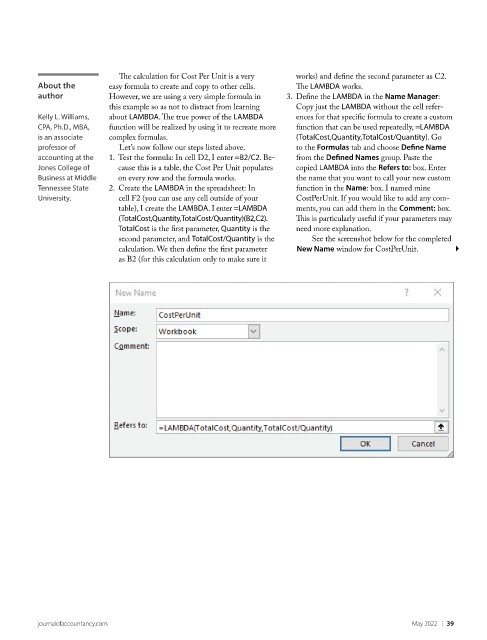
                             second parameter, and TotalCost/Quantity is the        See the screenshot below for the completed
                             calculation. We then define the first parameter        New Name window for CostPerUnit.
                             as B2 (for this calculation only to make sure it


          journalofaccountancy.com                                                                May 2022    |   39

