


Page 210 - JoFA_2022
P. 210
TECHNOLOGY Q&A


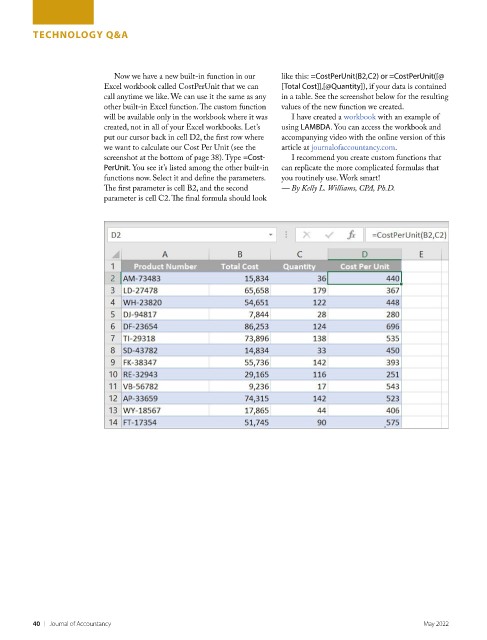
                            Now we have a new built-in function in our   like this: =CostPerUnit(B2,C2) or =CostPerUnit([@
                          Excel workbook called CostPerUnit that we can   [Total Cost]],[@Quantity]), if your data is contained
                          call anytime we like. We can use it the same as any   in a table. See the screenshot below for the resulting
                          other built-in Excel function. The custom function   values of the new function we created.
                          will be available only in the workbook where it was   I have created a workbook with an example of
                          created, not in all of your Excel workbooks. Let’s   using LAMBDA. You can access the workbook and
                          put our cursor back in cell D2, the first row where   accompanying video with the online version of this
                          we want to calculate our Cost Per Unit (see the   article at journalofaccountancy.com.
                          screenshot at the bottom of page 38). Type =Cost-  I recommend you create custom functions that
                          PerUnit. You see it’s listed among the other built-in   can replicate the more complicated formulas that
                          functions now. Select it and define the parameters.   you routinely use. Work smart!
                          The first parameter is cell B2, and the second   — By Kelly L. Williams, CPA, Ph.D.
                          parameter is cell C2. The final formula should look


         40    |   Journal of Accountancy                                                            May 2022

