


Page 485 - JoFA_2022
P. 485
TECHNOLOGY Q&A


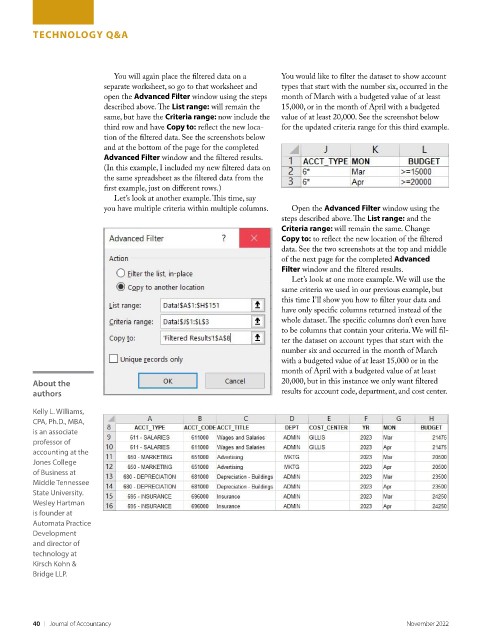
                            You will again place the filtered data on a   You would like to filter the dataset to show account
                          separate worksheet, so go to that worksheet and   types that start with the number six, occurred in the
                          open the Advanced Filter window using the steps   month of March with a budgeted value of at least
                          described above. The List range: will remain the   15,000, or in the month of April with a budgeted
                          same, but have the Criteria range: now include the   value of at least 20,000. See the screenshot below
                          third row and have Copy to: reflect the new loca-  for the updated criteria range for this third example.
                          tion of the filtered data. See the screenshots below
                          and at the bottom of the page for the completed
                          Advanced Filter window and the filtered results.
                          (In this example, I included my new filtered data on
                          the same spreadsheet as the filtered data from the
                          first example, just on different rows.)
                            Let’s look at another example. This time, say
                          you have multiple criteria within multiple columns.   Open the Advanced Filter window using the
                                                                    steps described above. The List range: and the
                                                                    Criteria range: will remain the same. Change
                                                                    Copy to: to reflect the new location of the filtered
                                                                    data. See the two screenshots at the top and middle
                                                                    of the next page for the completed Advanced
                                                                    Filter window and the filtered results.
                                                                      Let’s look at one more example. We will use the
                                                                    same criteria we used in our previous example, but
                                                                    this time I’ll show you how to filter your data and
                                                                    have only specific columns returned instead of the
                                                                    whole dataset. The specific columns don’t even have
                                                                    to be columns that contain your criteria. We will fil-
                                                                    ter the dataset on account types that start with the
                                                                    number six and occurred in the month of March
                                                                    with a budgeted value of at least 15,000 or in the
                                                                    month of April with a budgeted value of at least
         About the                                                  20,000, but in this instance we only want filtered
         authors                                                    results for account code, department, and cost center.

         Kelly L. Williams,
         CPA, Ph.D., MBA,
         is an associate
         professor of
         accounting at the
         Jones College
         of Business at
         Middle Tennessee
         State University.
         Wesley Hartman
         is founder at
         Automata Practice
         Development
         and director of
         technology at
         Kirsch Kohn &
         Bridge LLP.


         40    |   Journal of Accountancy                                                        November 2022

