


Page 483 - JoFA_2022
P. 483
TECHNOLOGY Q&A


         MICROSOFT EXCEL
         Using Advanced Filter in Excel


         Q. I have used   A. There is a simple filter feature available in Excel,   have a budgeted value of at least 20,000. Start by
         the filter feature   which is very useful. However, sometimes you may   creating a “criteria range” specifying these three cri-
         in Excel, but    need to filter your data in more complicated ways,   teria. To the side of your data or on a new spread-
         what does the    such as having multiple criteria or using wild card   sheet, copy and paste the three headings of the col-
         Advanced Filter   criteria. Wild card criteria find values that share   umns you are filtering: ACCT_TYPE, MON, and
         feature do?      some of the same characters but not all, such as   BUDGET. Under each heading, specify the criteria
                          all customers whose last names start with “Su.” In   for your filter. In order to find account types that
                          these cases, using Advanced Filter is much easier.   start with the number six, the criteria will be 6*.
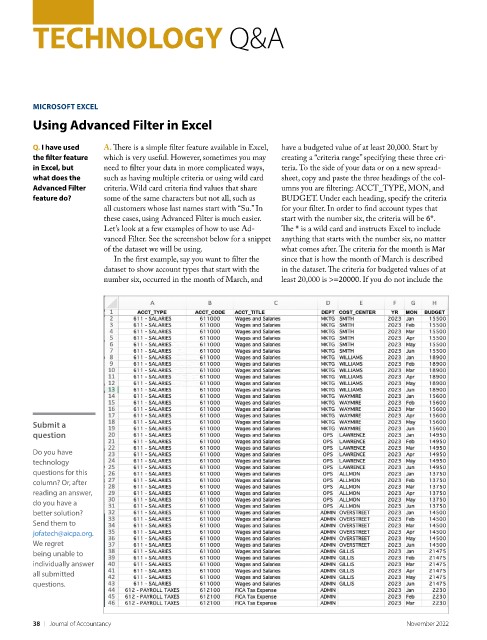
                          Let’s look at a few examples of how to use Ad-  The * is a wild card and instructs Excel to include
                          vanced Filter. See the screenshot below for a snippet   anything that starts with the number six, no matter
                          of the dataset we will be using.          what comes after. The criteria for the month is Mar
                            In the first example, say you want to filter the   since that is how the month of March is described
                          dataset to show account types that start with the   in the dataset. The criteria for budgeted values of at
                          number six, occurred in the month of March, and   least 20,000 is >=20000. If you do not include the


         Submit a
         question
         Do you have
         technology
         questions for this
         column? Or, after
         reading an answer,
         do you have a
         better solution?
         Send them to
         jofatech@aicpa.org.
         We regret
         being unable to
         individually answer
         all submitted
         questions.


         38    |   Journal of Accountancy                                                        November 2022

