


Page 487 - JoFA_2022
P. 487
TECHNOLOGY Q&A


         MICROSOFT EXCEL

         How to compare documents

         Q. I sent some   A. Turning on Track Changes is one of the best   version your partner revised. Click OK and a new
         Word documents   ways to review revisions, but all is not lost if you   Word window will open.
         to a partner to   forget to turn it on. Conveniently, Word has a func-  By default, you will see four sections. The top
         review. They     tion that is specifically for comparing two docu-  right will be your original document. The bottom
         reviewed and     ments. In the Ribbon, go to Review and then click   right will be the version the partner marked up. If
         made changes,    on Compare. You are given two options, Compare   you do not see the two right sections, click on Com-
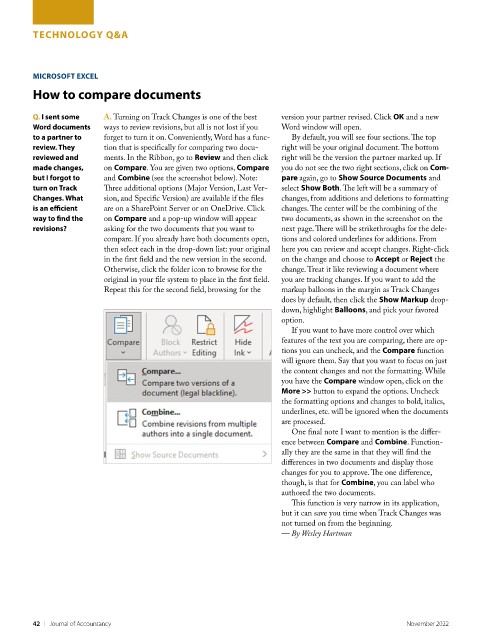
         but I forgot to   and Combine (see the screenshot below). Note:   pare again, go to Show Source Documents and
         turn on Track    Three additional options (Major Version, Last Ver-  select Show Both. The left will be a summary of
         Changes. What    sion, and Specific Version) are available if the files   changes, from additions and deletions to formatting
         is an efficient   are on a SharePoint Server or on OneDrive. Click   changes. The center will be the combining of the
         way to find the   on Compare and a pop-up window will appear   two documents, as shown in the screenshot on the
         revisions?       asking for the two documents that you want to   next page. There will be strikethroughs for the dele-
                          compare. If you already have both documents open,   tions and colored underlines for additions. From
                          then select each in the drop-down list: your original   here you can review and accept changes. Right-click
                          in the first field and the new version in the second.    on the change and choose to Accept or Reject the
                          Otherwise, click the folder icon to browse for the   change. Treat it like reviewing a document where
                          original in your file system to place in the first field.   you are tracking changes. If you want to add the
                          Repeat this for the second field, browsing for the   markup balloons in the margin as Track Changes
                                                                    does by default, then click the Show Markup drop-
                                                                    down, highlight Balloons, and pick your favored
                                                                    option.
                                                                      If you want to have more control over which
                                                                    features of the text you are comparing, there are op-
                                                                    tions you can uncheck, and the Compare function
                                                                    will ignore them. Say that you want to focus on just
                                                                    the content changes and not the formatting. While
                                                                    you have the Compare window open, click on the
                                                                    More >> button to expand the options. Uncheck
                                                                    the formatting options and changes to bold, italics,
                                                                    underlines, etc. will be ignored when the documents
                                                                    are processed.
                                                                      One final note I want to mention is the differ-
                                                                    ence between Compare and Combine. Function-
                                                                    ally they are the same in that they will find the
                                                                    differences in two documents and display those
                                                                    changes for you to approve. The one difference,
                                                                    though, is that for Combine, you can label who
                                                                    authored the two documents.
                                                                      This function is very narrow in its application,
                                                                    but it can save you time when Track Changes was
                                                                    not turned on from the beginning.
                                                                    — By Wesley Hartman


         42    |   Journal of Accountancy                                                        November 2022

