


Page 484 - JoFA_2022
P. 484
equal sign, the filter will not capture budgeted   go back to the original worksheet and select cells
                             values that are exactly 20,000. See the screenshot   J1:L2, which contain your three criteria, includ-
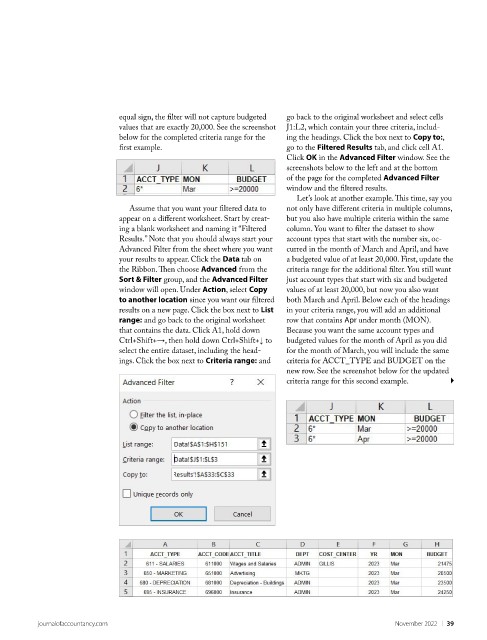
                             below for the completed criteria range for the   ing the headings. Click the box next to Copy to:,
                             first example.                          go to the Filtered Results tab, and click cell A1.
                                                                     Click OK in the Advanced Filter window. See the
                                                                     screenshots below to the left and at the bottom
                                                                     of the page for the completed Advanced Filter
                                                                     window and the filtered results.
                                                                       Let’s look at another example. This time, say you
                                Assume that you want your filtered data to   not only have different criteria in multiple columns,
                             appear on a different worksheet. Start by creat-  but you also have multiple criteria within the same
                             ing a blank worksheet and naming it “Filtered   column. You want to filter the dataset to show
                             Results.” Note that you should always start your   account types that start with the number six, oc-
                             Advanced Filter from the sheet where you want   curred in the month of March and April, and have
                             your results to appear. Click the Data tab on   a budgeted value of at least 20,000. First, update the
                             the Ribbon. Then choose Advanced from the   criteria range for the additional filter. You still want
                             Sort & Filter group, and the Advanced Filter   just account types that start with six and budgeted
                             window will open. Under Action, select Copy   values of at least 20,000, but now you also want
                             to another location since you want our filtered   both March and April. Below each of the headings
                             results on a new page. Click the box next to List   in your criteria range, you will add an additional
                             range: and go back to the original worksheet   row that contains Apr under month (MON).
                             that contains the data. Click A1, hold down   Because you want the same account types and
                             Ctrl+Shift+→, then hold down Ctrl+Shift+↓ to   budgeted values for the month of April as you did
                             select the entire dataset, including the head-  for the month of March, you will include the same
                             ings. Click the box next to Criteria range: and   criteria for ACCT_TYPE and BUDGET on the
                                                                     new row. See the screenshot below for the updated
                                                                     criteria range for this second example.


          journalofaccountancy.com                                                            November 2022    |   39

