


Page 486 - JoFA_2022
P. 486
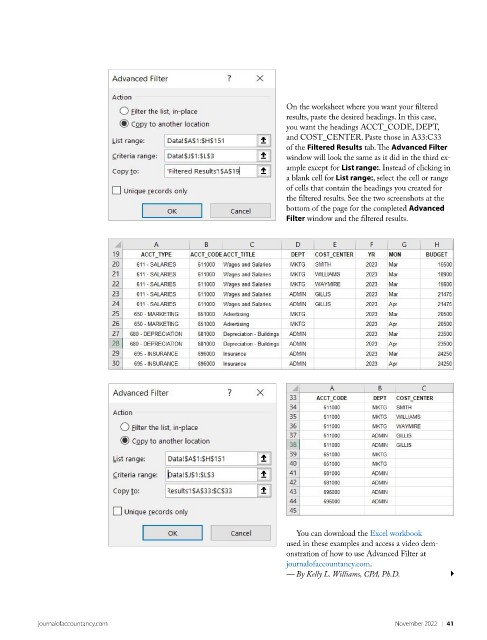
On the worksheet where you want your filtered
                                                                     results, paste the desired headings. In this case,
                                                                     you want the headings ACCT_CODE, DEPT,
                                                                     and COST_CENTER. Paste those in A33:C33
                                                                     of the Filtered Results tab. The Advanced Filter
                                                                     window will look the same as it did in the third ex-
                                                                     ample except for List range:. Instead of clicking in
                                                                     a blank cell for List range:, select the cell or range
                                                                     of cells that contain the headings you created for
                                                                     the filtered results. See the two screenshots at the
                                                                     bottom of the page for the completed Advanced
                                                                     Filter window and the filtered results.


                                                                       You can download the Excel workbook
                                                                     used in these examples and access a video dem-
                                                                     onstration of how to use Advanced Filter at
                                                                     journalofaccountancy.com.
                                                                     — By Kelly L. Williams, CPA, Ph.D.


          journalofaccountancy.com                                                            November 2022    |   41

