


Page 531 - JoFA_2022
P. 531
TECHNOLOGY Q&A


         MICROSOFT EXCEL
         Automatically create subtotals in Excel


         Q. I receive     A. There are several reasons to use SUBTOTAL   the Subtotal window will open. Under At each
         regular          instead of SUM when inserting subtotals in your   change in:, choose ACCT_TYPE since that
         spreadsheets     spreadsheet. One reason is that the subtotals are   is what we decided to subtotal. However, you
         with all of our   ignored when calculating the grand total, making   do not have to subtotal by the first column; you
         company’s        it much easier to sum the entire spreadsheet. Other   could have picked from any of the columns in the
         accounts,        benefits to using SUBTOTAL are that you can opt   dataset. Under Use function:, choose Sum, which
         departments,     to ignore any numbers that have been hidden,   is the default. Notice there are several options
         employees, and   dynamically summarize data, and sum filtered   you could choose other than SUM. Under Add
         balances, and I   values. And one of the most useful reasons is that   subtotal to:, choose BUDGET since this is what
         have to subtotal   you can automatically create the subtotals, saving a   we want totaled for each account type. There are
         the amounts      considerable amount of time.              three checkboxes at the bottom of the Subtotal
         by accounts,       You can download an Excel workbook similar   window. The first one is Replace current subto-
         departments,     to the one described in the question and access   tals, which will remove any subtotals currently
         etc. I have been   a video demonstration of how to automatically   in the dataset with the new ones. By default, this
         manually doing   create subtotals that accompany this article at   is already checked. Although I did not have any
         this using the   journalofaccountancy.com.                 existing subtotals in my spreadsheet, I will leave
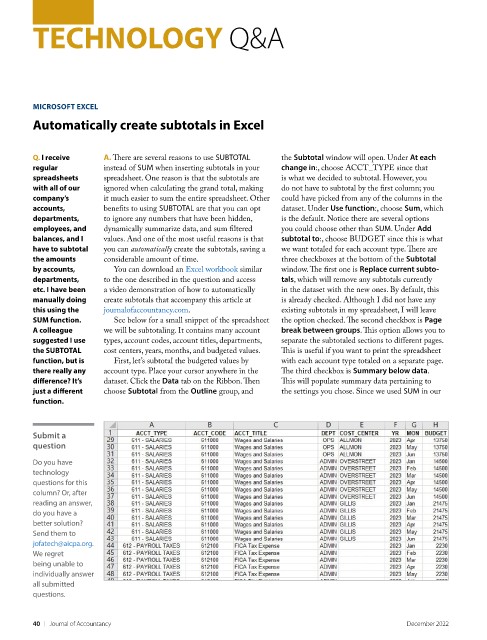
         SUM function.      See below for a small snippet of the spreadsheet   the option checked. The second checkbox is Page
         A colleague      we will be subtotaling. It contains many account   break between groups. This option allows you to
         suggested I use   types, account codes, account titles, departments,   separate the subtotaled sections to different pages.
         the SUBTOTAL     cost centers, years, months, and budgeted values.    This is useful if you want to print the spreadsheet
         function, but is   First, let’s subtotal the budgeted values by   with each account type totaled on a separate page.
         there really any   account type. Place your cursor anywhere in the   The third checkbox is Summary below data.
         difference? It’s   dataset. Click the Data tab on the Ribbon. Then   This will populate summary data pertaining to
         just a different   choose Subtotal from the Outline group, and   the settings you chose. Since we used SUM in our
         function.


         Submit a
         question

         Do you have
         technology
         questions for this
         column? Or, after
         reading an answer,
         do you have a
         better solution?
         Send them to
         jofatech@aicpa.org.
         We regret
         being unable to
         individually answer
         all submitted
         questions.


         40    |   Journal of Accountancy                                                        December 2022

