


Page 92 - JoFA_2022
P. 92
TECHNOLOGY Q&A


         MICROSOFT EXCEL

         Transposing data in Excel

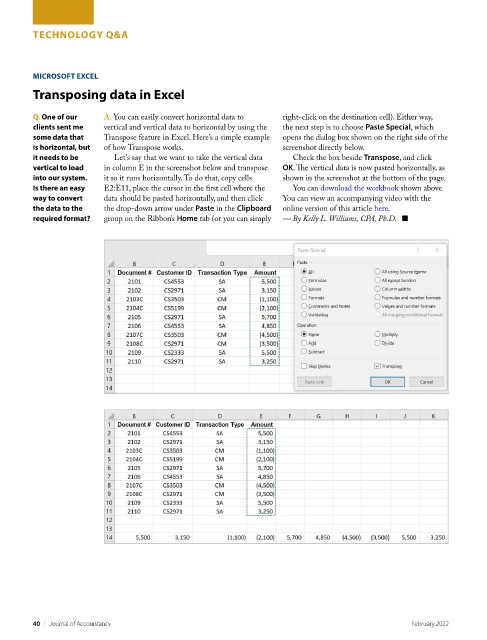
         Q. One of our    A. You can easily convert horizontal data to   right-click on the destination cell). Either way,
         clients sent me   vertical and vertical data to horizontal by using the   the next step is to choose Paste Special, which
         some data that   Transpose feature in Excel. Here’s a simple example   opens the dialog box shown on the right side of the
         is horizontal, but   of how Transpose works.               screenshot directly below.
         it needs to be     Let’s say that we want to take the vertical data   Check the box beside Transpose, and click
         vertical to load   in column E in the screenshot below and transpose   OK. The vertical data is now pasted horizontally, as
         into our system.   it so it runs horizontally. To do that, copy cells   shown in the screenshot at the bottom of the page.
         Is there an easy   E2:E11, place the cursor in the first cell where the   You can download the workbook shown above.
         way to convert   data should be pasted horizontally, and then click   You can view an accompanying video with the
         the data to the   the drop-down arrow under Paste in the Clipboard   online version of this article here.
         required format?    group on the Ribbon’s Home tab (or you can simply   — By Kelly L. Williams, CPA, Ph.D.   ■


         40    |   Journal of Accountancy                                                         February 2022

