


Page 88 - JoFA_2022
P. 88
TECHNOLOGY Q&A


         MICROSOFT EXCEL
         Automate routine data entry with Excel Flash Fill


         Q. I enjoy       A. Flash Fill is one of my favorite features in   the update or Esc to decline.
         learning about   Excel because it can do a lot of routine tasks. If   Excel can also pick up on more complicated
         ways to increase   Excel can sense a pattern in what you are doing,   patterns. Look at the screenshot at the top of the
         my efficiency    it will try to complete the task for you. Flash Fill   next page. Let’s say we want to extract information
         and save time in   can be used with Excel 2013 and later versions on   from columns A, B, and C and have the name in
         Microsoft Excel.   Windows and Excel 2016 and later versions on   column D be formatted as last name, followed by
         Do you have      Macs. You can download a workbook I created   a comma, then a space and the first name, then a
         any other tips to   with examples of using Flash Fill. You can access   space and middle initial with a period.
         share?           an accompanying video with the website version of   In cell D2, I type Deen, Kent W., then go to cell
                          this article here.                        D3 and start typing the next name. By the time I
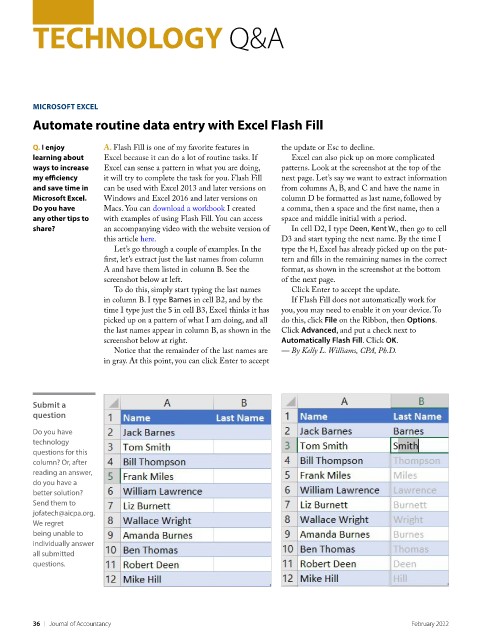
                            Let’s go through a couple of examples. In the   type the H, Excel has already picked up on the pat-
                          first, let’s extract just the last names from column   tern and fills in the remaining names in the correct
                          A and have them listed in column B. See the   format, as shown in the screenshot at the bottom
                          screenshot below at left.                 of the next page.
                            To do this, simply start typing the last names   Click Enter to accept the update.
                          in column B. I type Barnes in cell B2, and by the   If Flash Fill does not automatically work for
                          time I type just the S in cell B3, Excel thinks it has   you, you may need to enable it on your device. To
                          picked up on a pattern of what I am doing, and all   do this, click File on the Ribbon, then Options.
                          the last names appear in column B, as shown in the   Click Advanced, and put a check next to
                          screenshot below at right.                Automatically Flash Fill. Click OK.
                            Notice that the remainder of the last names are   — By Kelly L. Williams, CPA, Ph.D.
                          in gray. At this point, you can click Enter to accept


         Submit a
         question
         Do you have
         technology
         questions for this
         column? Or, after
         reading an answer,
         do you have a
         better solution?
         Send them to
         jofatech@aicpa.org.
         We regret
         being unable to
         individually answer
         all submitted
         questions.


         36    |   Journal of Accountancy                                                         February 2022

