


Page 90 - JoFA_2022
P. 90
TECHNOLOGY Q&A


         MICROSOFT EXCEL

         How to spill formulas in Excel

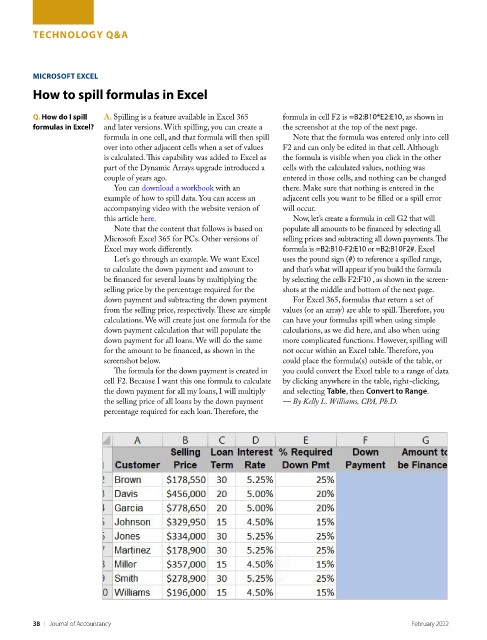
         Q. How do I spill   A. Spilling is a feature available in Excel 365   formula in cell F2 is =B2:B10*E2:E10, as shown in
         formulas in Excel?  and later versions. With spilling, you can create a   the screenshot at the top of the next page.
                          formula in one cell, and that formula will then spill   Note that the formula was entered only into cell
                          over into other adjacent cells when a set of values   F2 and can only be edited in that cell. Although
                          is calculated. This capability was added to Excel as   the formula is visible when you click in the other
                          part of the Dynamic Arrays upgrade introduced a   cells with the calculated values, nothing was
                          couple of years ago.                      entered in those cells, and nothing can be changed
                            You can download a workbook with an     there. Make sure that nothing is entered in the
                          example of how to spill data. You can access an   adjacent cells you want to be filled or a spill error
                          accompanying video with the website version of   will occur.
                          this article here.                          Now, let’s create a formula in cell G2 that will
                            Note that the content that follows is based on   populate all amounts to be financed by selecting all
                          Microsoft Excel 365 for PCs. Other versions of   selling prices and subtracting all down payments. The
                          Excel may work differently.               formula is =B2:B10-F2:E10 or =B2:B10F2#. Excel
                            Let’s go through an example. We want Excel   uses the pound sign (#) to reference a spilled range,
                          to calculate the down payment and amount to   and that’s what will appear if you build the formula
                          be financed for several loans by multiplying the   by selecting the cells F2:F10 , as shown in the screen-
                          selling price by the percentage required for the   shots at the middle and bottom of the next page.
                          down payment and subtracting the down payment   For Excel 365, formulas that return a set of
                          from the selling price, respectively. These are simple   values (or an array) are able to spill. Therefore, you
                          calculations. We will create just one formula for the   can have your formulas spill when using simple
                          down payment calculation that will populate the   calculations, as we did here, and also when using
                          down payment for all loans. We will do the same   more complicated functions. However, spilling will
                          for the amount to be financed, as shown in the   not occur within an Excel table. Therefore, you
                          screenshot below.                         could place the formula(s) outside of the table, or
                            The formula for the down payment is created in   you could convert the Excel table to a range of data
                          cell F2. Because I want this one formula to calculate   by clicking anywhere in the table, right-clicking,
                          the down payment for all my loans, I will multiply   and selecting Table, then Convert to Range.
                          the selling price of all loans by the down payment   — By Kelly L. Williams, CPA, Ph.D.
                          percentage required for each loan. Therefore, the


         38    |   Journal of Accountancy                                                         February 2022

