


Page 93 - Divyank Tyagi
P. 93
|
                                                                              defining project orgAnizAtion    59


                             Schedule/Quantities   This is the most commonly used schedule type, allowing you to list
                             and quantify all the element category types. You would use this type to make door schedules,
                             wall schedules, window schedules, and so on. These schedule types are usually limited to
                             scheduling properties within the same category; however, you can create a multi-category
                             schedule or use some fields from other elements. For example, many model elements can refer
                             to the properties of the room in which they are placed.
                             Graphical Column Schedule    This schedule is different from the other schedule types and is
                             commonly used by structural engineers. Structural columns are displayed according to their
                             grid intersections, indicating top and bottom constraints as well as offsets.
                             Material Takeoff    This type of schedule lists all the materials and subcomponents of any
                             family category. You can use a material takeoff to measure any material that is utilized in a
                             component or assembly. For example, you might want to know the volume of concrete within
                             the model. Regardless of whether the concrete is in a wall or floor or column, you can tell the
                             schedule to report the total amount of that material in the project. Material takeoffs will report
                             material properties across multiple categories.
                             Sheet List    This schedule allows you to create a list of all the sheets in the project.
                             Note Block    This tool creates a unique schedule that lists the properties of a generic annota-
                             tion symbol used in a project.
                             View List    This schedule shows a list of all the views in the Project Browser and their proper-
                             ties. A view list can be a valuable tool to help you manage your project’s views efficiently.

                           Using Sheets
                           You will use sheets to organize views and other annotation for the purpose of issuing printable
                           (physical or digital) documents. Sheet borders can be customized, but the important fact to
                           realize is that sheets are always scaled at 1:1. The important thing to remember is that you’re not
                           going to select a scale when you print a sheet; it’s really more like printing than plotting. If you
                           need your sheet to be smaller or fit on the desired page, these options are available, and using
                           them is little different than printing from a word processing application.
                             You will learn more about creating sheets in Chapter 17.

                           Using 3D Views
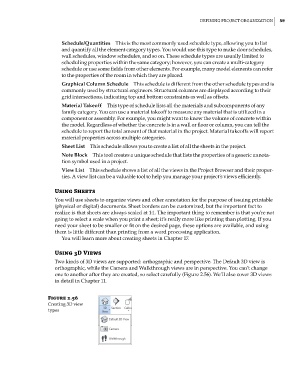
                           Two kinds of 3D views are supported: orthographic and perspective. The Default 3D view is
                           orthographic, while the Camera and Walkthrough views are in perspective. You can’t change
                           one to another after they are created, so select carefully (Figure 2.56). We’ll also cover 3D views
                           in detail in Chapter 11.


                        Figure 2.56
                        creating 3d view
                        types


          c02.indd   59                                                                              5/3/2014   10:32:14 AM

