


Page 92 - Divyank Tyagi
P. 92
58   |  ChAPter  2  Applying the principles of the User interfAce And project orgAnizAtion


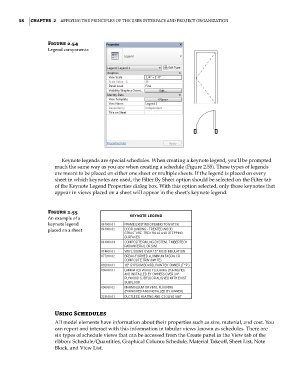
                        Figure 2.54
                        legend components


                             Keynote legends are special schedules. When creating a keynote legend, you’ll be prompted
                           much the same way as you are when creating a schedule (Figure 2.55). These types of legends
                           are meant to be placed on either one sheet or multiple sheets. If the legend is placed on every
                           sheet in which keynotes are used, the Filter By Sheet option should be selected on the Filter tab
                           of the Keynote Legend Properties dialog box. With this option selected, only those keynotes that
                           appear in views placed on a sheet will appear in the sheet’s keynote legend.


                        Figure 2.55
                        An example of a
                        keynote legend
                        placed on a sheet


                           Using Schedules
                           All model elements have information about their properties such as size, material, and cost. You
                           can report and interact with this information in tabular views known as schedules. There are
                           six types of schedule views that can be accessed from the Create panel in the View tab of the
                           ribbon: Schedule/Quantities, Graphical Column Schedule, Material Takeoff, Sheet List, Note
                           Block, and View List.


          c02.indd   58                                                                              5/3/2014   10:32:14 AM

