


Page 176 - Handout Computer Network.
P. 176
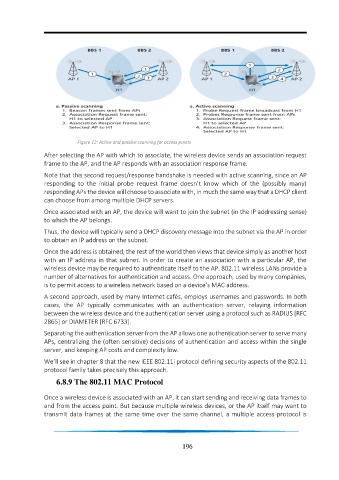
Figure 12: Active and passive scanning for access points
                 After selecting the AP with which to associate, the wireless device sends an association request
                 frame to the AP, and the AP responds with an association response frame.

                 Note that this second request/response handshake is needed with active scanning, since an AP
                 responding  to  the  initial  probe  request  frame  doesn’t  know  which  of  the  (possibly  many)
                 responding APs the device will choose to associate with, in much the same way that a DHCP client
                 can choose from among multiple DHCP servers.

                 Once associated with an AP, the device will want to join the subnet (in the IP addressing sense)
                 to which the AP belongs.
                 Thus, the device will typically send a DHCP discovery message into the subnet via the AP in order
                 to obtain an IP address on the subnet.
                 Once the address is obtained, the rest of the world then views that device simply as another host
                 with an IP address in that subnet. In order to create an association with a particular AP, the
                 wireless device may be required to authenticate itself to the AP. 802.11 wireless LANs provide a
                 number of alternatives for authentication and access. One approach, used by many companies,
                 is to permit access to a wireless network based on a device’s MAC address.
                 A second approach, used by many Internet cafés, employs usernames and passwords. In both
                 cases,  the  AP  typically  communicates  with  an  authentication  server,  relaying  information
                 between the wireless device and the authentication server using a protocol such as RADIUS [RFC
                 2865] or DIAMETER [RFC 6733].
                 Separating the authentication server from the AP allows one authentication server to serve many
                 APs, centralizing the (often sensitive) decisions of authentication and access within the single
                 server, and keeping AP costs and complexity low.

                 We’ll see in chapter 8 that the new IEEE 802.11i protocol defining security aspects of the 802.11
                 protocol family takes precisely this approach.

                     6.8.9 The 802.11 MAC Protocol

                 Once a wireless device is associated with an AP, it can start sending and receiving data frames to
                 and from the access point. But because multiple wireless devices, or the AP itself may want to
                 transmit data frames at the same time over the same channel, a multiple access protocol is


                                                                 196

