


Page 88 - M. Abrahim Thesis
P. 88
Chapter (4) Network Design


                                 Figure 4-4 shown a connection via get Unique Identifiers

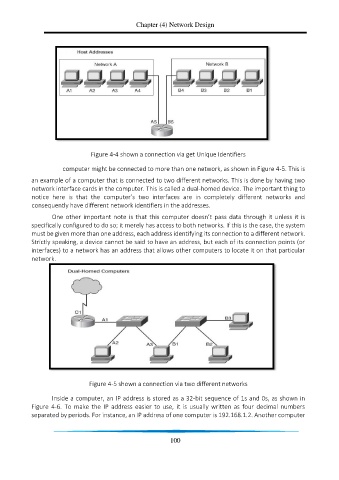
                        computer might be connected to more than one network, as shown in Figure 4-5. This is

            an example of a computer that is connected to two different networks. This is done by having two
            network interface cards in the computer. This is called a dual-homed device. The important thing to
            notice  here  is  that  the  computer’s  two  interfaces  are  in  completely  different  networks  and
            consequently have different network identifiers in the addresses.

                   One other important note is that this computer doesn’t pass data through it unless it is
            specifically configured to do so; it merely has access to both networks. If this is the case, the system
            must be given more than one address, each address identifying its connection to a different network.
            Strictly speaking, a device cannot be said to have an address, but each of its connection points (or
            interfaces) to a network has an address that allows other computers to locate it on that particular
            network.


                                Figure 4-5 shown a connection via two different networks

                   Inside a computer, an IP address is stored as a 32-bit sequence of 1s and 0s, as shown in
            Figure  4-6.  To  make  the  IP  address  easier  to  use,  it  is  usually  written  as  four  decimal  numbers
            separated by periods. For instance, an IP address of one computer is 192.168.1.2. Another computer


                                                             100

