


Page 122 - 3E User Manual- updated 3-2018
P. 122
Paperless Proforma Process


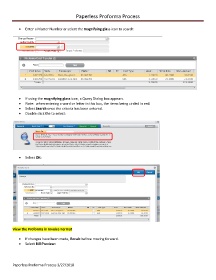
            •  Enter a Matter Number or select the magnifying glass icon to search:


            •  If using the magnifying glass icon, a Query Dialog box appears.
            •  Note:  when entering a word or letter in this box, the items being circled in red.
            •  Select Search once the criteria has been entered.
            •  Double click the to select:


            •  Select OK:


        View the Proforma in Invoice Format

            •  If changes have been made, Recalc before moving forward.
            •  Select Bill Preview:


        Paperless Proforma Process 3/27/2018

