


Page 117 - 3E User Manual- updated 3-2018
P. 117
Paperless Proforma Process
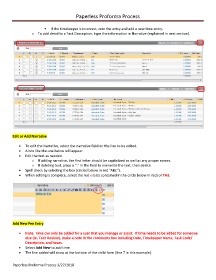
If the timekeeper is incorrect, zero the entry and add a new time entry.
o To add detail to a Task Description, type the information in Narrative (explained in next section).
Edit or Add Narrative
• To edit the Narrative, select the narrative field on the line to be edited.
• A box like the one below will appear.
• Edit the text as needed.
o If adding narrative, the first letter should be capitalized as well as any proper names.
o If deleting text, place a “.” in the field to overwrite the text, then delete.
• Spell check by selecting the box (circled below in red "ABC").
• When editing is complete, select the red x (also contained in the circle below in red) or TAB.
Add New Fee Entry
• Note: time can only be added for a user that you manage or assist. If time needs to be added for someone
else (ie. Tech Review), make a note in the comments box including Date, Timekeeper Name, Task Code/
Description, and hours.
• Select Add New to add time.
• The line added will show at the bottom of the child form (line 7 in this example).
Paperless Proforma Process 3/27/2018

