


Page 114 - 3E User Manual- updated 3-2018
P. 114
Paperless Proforma Process


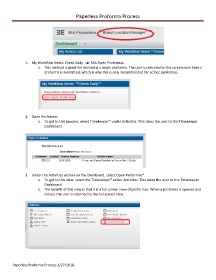
               1.  My Workflow Items: Check Daily         SEA Open Proformas
                       a.  This method is great for reviewing a single proforma. The user is returned to this screen each time a
                          proforma is submitted, which is why this is only recommended for ad hoc proformas.


               2.  Open Proformas
                       a.  To get to this process, select Timekeeper* under Activities. This takes the user to the Timekeeper
                          Dashboard.


               3.  Under the Activities section on the Dashboard, select Open Proformas*.
                       a.  To get to this view, select the Timekeeper* under Activities. This takes the user to the Timekeeper
                          Dashboard.
                       b.  The benefit of this view is that it is a full screen view of proformas. When a proforma is opened and
                          closed, the user is returned to the full screen view.


        Paperless Proforma Process 3/27/2018

