


Page 116 - 3E User Manual- updated 3-2018
P. 116
Paperless Proforma Process


            •  Budget Summary will print regardless of whether a budget exists.
            •  Matter Summary provides an overall picture of the matter.


        Proforma Totals

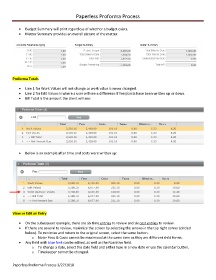
            •  Line 1 for Work Values will not change as work value is never changed.
            •  Line 2 for Edit Values is where a user will see a difference if fees/costs have been written up or down.
            •  Bill Total is the amount the client will see:


            •  Below is an example after time and costs were written up:


        View or Edit an Entry

            •  On the subsequent example, there are six time entries to review and six cost entries to review.
            •  If there are several to review, maximize the screen by selecting the arrows in the top right corner (circled
               below). To minimize and return to the original screen, select the same button.
                   o  Note- Fees & Costs cannot be maximized at the same time as they are different child forms.
            •  Any field with blue font can be edited, as well as the Narrative field.
                   o  To change a date, select the date field and either type in a new date or use the calendar button.
                   o  Timekeeper cannot be changed.


        Paperless Proforma Process 3/27/2018

