


Page 115 - 3E User Manual- updated 3-2018
P. 115
Paperless Proforma Process


        Open a Proforma

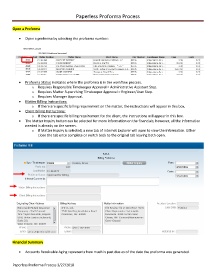
            •  Open a proforma by selecting the proforma number:


            •  Proforma Status indicates where the proforma is in the workflow process.
                   o  Requires Responsible Timekeeper Approval = Administrative Assistant Step.
                   o  Requires Matter Supervising Timekeeper Approval = Engineer/User Step.
                   o  Requires Manager Approval.
            •  Matter Billing Instructions:
                   o  If there are specific billing requirement on the matter, the instructions will appear in this box.
            •  Client Billing Instructions:
                   o  If there are specific billing requirement for the client, the instructions will appear in this box.
            •  The Matter Inquiry button can be selected for more information on the financials; however, all the information
               needed is already on the screen.
                   o  If Matter Inquiry is selected, a new tab of Internet Explorer will open to view the information. Either
                       close the tab once complete or switch back to the original tab leaving both open.


        Financial Summary

            •  Accounts Receivable Aging represents how much is past due as of the date the proforma was generated.


        Paperless Proforma Process 3/27/2018

