


Page 62 - Computer Graphics Handout
P. 62
2.6.2 Two-Dimensional Viewing
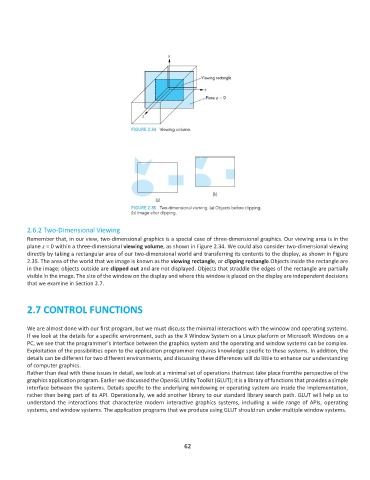
          Remember that, in our view, two-dimensional graphics is a special case of three-dimensional graphics. Our viewing area is in the
          plane z = 0 within a three-dimensional viewing volume, as shown in Figure 2.34. We could also consider two-dimensional viewing
          directly by taking a rectangular area of our two-dimensional world and transferring its contents to the display, as shown in Figure
          2.35. The area of the world that we image is known as the viewing rectangle, or clipping rectangle.Objects inside the rectangle are
          in the image; objects outside are clipped out and are not displayed. Objects that straddle the edges of the rectangle are partially
          visible in the image. The size of the window on the display and where this window is placed on the display are independent decisions
          that we examine in Section 2.7.


          2.7 CONTROL FUNCTIONS


          We are almost done with our first program, but we must discuss the minimal interactions with the window and operating systems.
          If we look at the details for a specific environment, such as the X Window System on a Linux platform or Microsoft Windows on a
          PC, we see that the programmer’s interface between the graphics system and the operating and window systems can be complex.
          Exploitation of the possibilities open to the application programmer requires knowledge specific to these systems. In addition, the
          details can be different for two different environments, and discussing these differences will do little to enhance our understanding
          of computer graphics.
          Rather than deal with these issues in detail, we look at a minimal set of operations thatmust take place fromthe perspective of the
          graphics application program. Earlier we discussed the OpenGL Utility Toolkit (GLUT); it is a library of functions that provides a simple
          interface between the systems. Details specific to the underlying windowing or operating system are inside the implementation,
          rather than being part of its API. Operationally, we add another library to our standard library search path. GLUT will help us to
          understand  the  interactions  that  characterize  modern  interactive  graphics  systems,  including  a  wide  range  of  APIs,  operating
          systems, and window systems. The application programs that we produce using GLUT should run under multiple window systems.


                                                              62

