


Page 57 - Computer Graphics Handout
P. 57
There are many matters that we are not exploring fully here and will return to in Chapter 6. Most concern the differences among
          various sets of primaries or the limitations conferred by the physical constraints of real devices. In particular, the set of colors
          produced by one device—its color gamut—is not the same as for other devices, nor will it match the human’s color gamut. In
          addition, the tristimulus values used on one device will not produce the same visible color as the same tristimulus values used on
          another device.

          2.5.1 RGB Color
          Now we can look at how color is handled in a graphics system from the programmer’s perspective—that is, through the API. There
          are two different approaches. We will stress the RGB-color model because an understanding of it will be crucial for our later
          discussion of shading. Historically, the indexed-colormodel (Section 2.5.2) was easier to support in hardware because of its lower
          memory requirements and the limited colors available on displays, but in modern systems RGB color has become the norm.
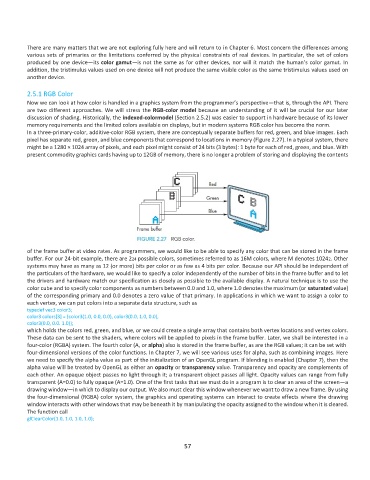
          In a three-primary-color, additive-color RGB system, there are conceptually separate buffers for red, green, and blue images. Each
          pixel has separate red, green, and blue components that correspond to locations in memory (Figure 2.27). In a typical system, there
          might be a 1280 × 1024 array of pixels, and each pixel might consist of 24 bits (3 bytes): 1 byte for each of red, green, and blue. With
          present commodity graphics cards having up to 12GB of memory, there is no longer a problem of storing and displaying the contents


          of the frame buffer at video rates. As programmers, we would like to be able to specify any color that can be stored in the frame
          buffer. For our 24-bit example, there are 224 possible colors, sometimes referred to as 16M colors, where M denotes 10242. Other
          systems may have as many as 12 (or more) bits per color or as few as 4 bits per color. Because our API should be independent of
          the particulars of the hardware, we would like to specify a color independently of the number of bits in the frame buffer and to let
          the drivers and hardware match our specification as closely as possible to the available display. A natural technique is to use the
          color cube and to specify color components as numbers between 0.0 and 1.0, where 1.0 denotes the maximum (or saturated value)
          of the corresponding primary and 0.0 denotes a zero value of that primary. In applications in which we want to assign a color to
          each vertex, we can put colors into a separate data structure, such as
          typedef vec3 color3;
          color3 colors[3] = {color3(1.0, 0.0, 0.0), color3(0.0, 1.0, 0.0),
          color3(0.0, 0.0. 1.0)};
          which holds the colors red, green, and blue, or we could create a single array that contains both vertex locations and vertex colors.
          These data can be sent to the shaders, where colors will be applied to pixels in the frame buffer. Later, we shall be interested in a
          four-color (RGBA) system. The fourth color (A, or alpha) also is stored in the frame buffer, as are the RGB values; it can be set with
          four-dimensional versions of the color functions. In Chapter 7, we will see various uses for alpha, such as combining images. Here
          we need to specify the alpha value as part of the initialization of an OpenGL program. If blending is enabled (Chapter 7), then the
          alpha value will be treated by OpenGL as either an opacity or transparency value. Transparency and opacity are complements of
          each other. An opaque object passes no light through it; a transparent object passes all light. Opacity values can range from fully
          transparent (A=0.0) to fully opaque (A=1.0). One of the first tasks that we must do in a program is to clear an area of the screen—a
          drawing window—in which to display our output. We also must clear this window whenever we want to draw a new frame. By using
          the four-dimensional (RGBA) color system, the graphics and operating systems can interact to create effects where the drawing
          window interacts with other windows that may be beneath it by manipulating the opacity assigned to the window when it is cleared.
          The function call
          glClearColor(1.0, 1.0, 1.0, 1.0);


                                                              57

