


Page 68 - Computer Graphics Handout
P. 68
2.8.4 Combining the Parts
          We now have the pieces but need to put them together. In particular, we have to compile the shaders, connect variables in the
          application with their counterparts in the shaders, and link everything together. We start with the bare minimum. Shaders must be
          compiled and linked.Most of the time we will do these operations as part of initialization so we can put the necessary code in a
          function initShader that will remain almost unchanged from application to application.

          2.8.5 The initShader Function
          A typical application contains three distinct parts: the application program, which comprises a main function and other functions
          such as init, a vertex shader, and a fragment shader. The first part is a set of C (or C++) functions, whereas the shaders are written
          in GLSL. To obtain a module that we can execute, we have to connect these entities, a process that involves reading source code
          from files, compiling the individual parts, and linking everything together.We can control this process through our application using
          a set of OpenGL functions that we will discuss in detail in Chapter 3. Here it will be sufficient to describe the steps briefly.
          Our first step is to create a container called a programobject to hold our shaders and two shader objects, one for each type of
          shader. The program object has an integer identifier we can use to refer to it in the application. After we create these objects, we
          can attach the shaders to the programobject. Generally, the shader source code will be in standard text files. We read them into
          strings that can be attached to the program and compiled. If the compilation is successful, the application and shaders can be linked
          together. Assuming we have the vertex shader source in a file vshader.glsl and the fragment shader in a file fshader.glsl, we can
          execute the above steps by a function call of the form
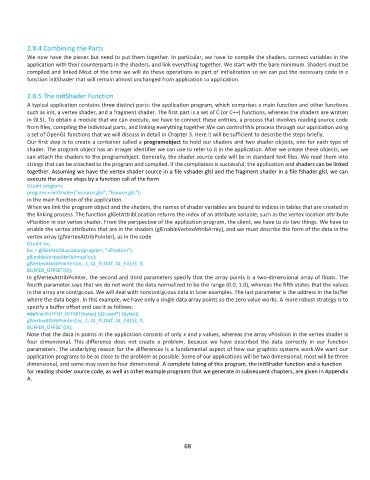
          GLuint program;
          program = InitShader("vsource.glsl", "fsource.glsl");
          in the main function of the application.
          When we link the program object and the shaders, the names of shader variables are bound to indices in tables that are created in
          the linking process. The function glGetAttribLocation returns the index of an attribute variable, such as the vertex location attribute
          vPosition in our vertex shader. From the perspective of the application program, the client, we have to do two things. We have to
          enable the vertex attributes that are in the shaders (glEnableVertexAttribArray), and we must describe the form of the data in the
          vertex array (glVertexAttribPointer), as in the code
          GLuint loc;
          loc = glGetAttribLocation(program, "vPosition");
          glEnableVertexAttribArray(loc);
          glVertexAttribPointer(loc, 2, GL_FLOAT, GL_FALSE, 0,
          BUFFER_OFFSET(0));
          In glVertexAttribPointer, the second and third parameters specify that the array points is a two-dimensional array of floats. The
          fourth parameter says that we do not want the data normalized to be the range (0.0, 1.0), whereas the fifth states that the values
          in the array are contiguous. We will deal with noncontiguous data in later examples. The last parameter is the address in the buffer
          where the data begin. In this example, we have only a single data array points so the zero value works. A more robust strategy is to
          specify a buffer offset and use it as follows:
          #define BUFFER_OFFSET(bytes) ((GLvoid*) (bytes))
          glVertexAttribPointer(loc, 2, GL_FLOAT, GL_FALSE, 0,
          BUFFER_OFFSET(0));
          Note that the data in points in the application consists of only x and y values, whereas the array vPosition in the vertex shader is
          four  dimensional.  This  difference  does  not  create  a  problem,  because  we  have  described  the  data  correctly  in  our  function
          parameters. The underlying reason for the differences is a fundamental aspect of how our graphics systems work.We want our
          application programs to be as close to the problem as possible. Some of our applications will be two dimensional; most will be three
          dimensional, and some may even be four dimensional. A complete listing of this program, the initShader function and a function
          for reading shader source code, as well as other example programs that we generate in subsequent chapters, are given in Appendix
          A.


                                                              68

