


Page 1431 - Foton Workshop Manual - Auman EST-M
P. 1431
Electrical system – electrical components                  EL - 7

                                                                                                                  IN
              Battery

              Change                                                                                              DI

              1. Turn off all power consuming appliances.
              2. Ignition key: LOCK status                                                                        EG
              3. Removing the battery compartment cover

              a. Pull  up the rubber clamp  on the battery compartment cover, and  move it  from the retaining slot  on the   TR
              battery compartment cover.

              b. Remove the battery compartment cover.
                                                                                                                  AX
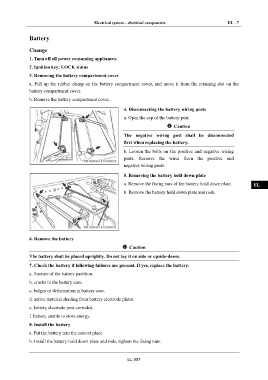
                                                        4. Disconnecting the battery wiring posts
                                                        a. Open the cap of the battery post.                      FR
                                                                               Caution

                                                        The  negative  wiring  post  shall  be  disconnected      ST
                                                        first when replacing the battery.
                                                        b. Loosen the bolts on the  positive and  negative  wiring   BR
                                                        posts.  Remove  the  wires  from  the  positive  and

                                                        negative wiring posts.
                                                                                                                  BW
                                                        5. Removing the battery hold down plate
                                                        a. Remove the fixing nuts of the battery hold down plate.   EL

                                                        b. Remove the battery hold down plate and rods.


              6. Remove the battery

                                                           Caution

              The battery shall be placed uprightly. Do not lay it on side or upside-down.

              7. Check the battery if following failures are present. If yes, replace the battery.

              a. fracture of the battery partition.

              b. cracks in the battery case.

              c. bulges or deformation in battery case.

              d. active material shading from battery electrode plates.

              e. battery electrode post corroded.

              f. battery unable to store energy.

              8. Install the battery

              a. Put the battery into the correct place.

              b. Install the battery hold down plate and rods, tighten the fixing nuts.


                                                          EL-007

