


Page 131 - JoFA_2022
P. 131
TECHNOLOGY Q&A


         MICROSOFT EXCEL

         Combining formulas and text in the same cell in Excel

         Q. Is there a way   A. You can include both a formula and text in the   with a formula. Otherwise, Excel will simply
         to include both a   same cell in Excel. You can do this in many ways,   display exactly what you typed and not perform the
         formula and text   depending on what you are trying to accomplish.   calculation. Remember to include a space between
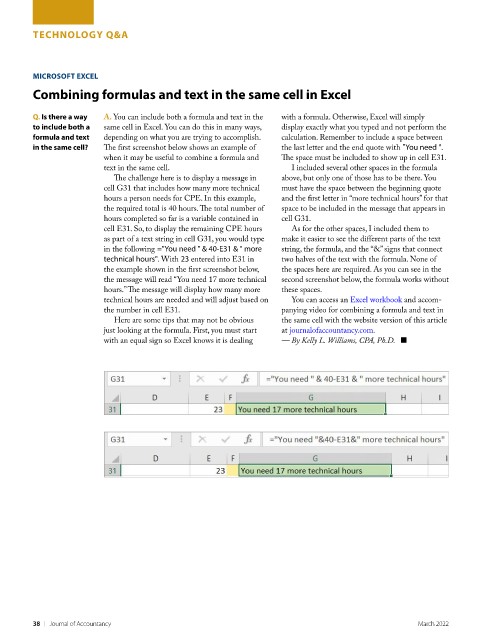
         in the same cell?   The first screenshot below shows an example of   the last letter and the end quote with "You need ".
                          when it may be useful to combine a formula and   The space must be included to show up in cell E31.
                          text in the same cell.                      I included several other spaces in the formula
                            The challenge here is to display a message in   above, but only one of those has to be there. You
                          cell G31 that includes how many more technical   must have the space between the beginning quote
                          hours a person needs for CPE. In this example,   and the first letter in “more technical hours” for that
                          the required total is 40 hours. The total number of   space to be included in the message that appears in
                          hours completed so far is a variable contained in   cell G31.
                          cell E31. So, to display the remaining CPE hours   As for the other spaces, I included them to
                          as part of a text string in cell G31, you would type   make it easier to see the different parts of the text
                          in the following ="You need " & 40-E31 & " more   string, the formula, and the “&” signs that connect
                          technical hours". With 23 entered into E31 in   two halves of the text with the formula. None of
                          the example shown in the first screenshot below,   the spaces here are required. As you can see in the
                          the message will read “You need 17 more technical   second screenshot below, the formula works without
                          hours.” The message will display how many more   these spaces.
                          technical hours are needed and will adjust based on   You can access an Excel workbook and accom-
                          the number in cell E31.                   panying video for combining a formula and text in
                            Here are some tips that may not be obvious   the same cell with the website version of this article
                          just looking at the formula. First, you must start   at journalofaccountancy.com.
                          with an equal sign so Excel knows it is dealing   — By Kelly L. Williams, CPA, Ph.D.   ■


         38    |   Journal of Accountancy                                                           March 2022

