


Page 126 - JoFA_2022
P. 126
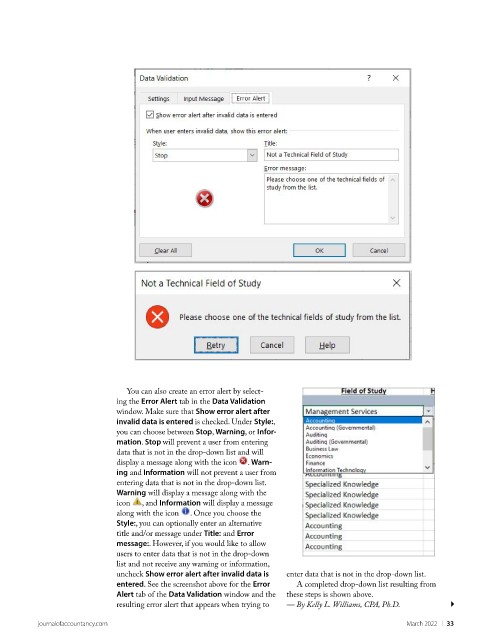
You can also create an error alert by select-
                             ing the Error Alert tab in the Data Validation
                             window. Make sure that Show error alert after
                             invalid data is entered is checked. Under Style:,
                             you can choose between Stop, Warning, or Infor-
                             mation. Stop will prevent a user from entering
                             data that is not in the drop-down list and will
                             display a message along with the icon   . Warn-
                             ing and Information will not prevent a user from
                             entering data that is not in the drop-down list.
                             Warning will display a message along with the
                             icon   , and Information will display a message
                             along with the icon   . Once you choose the
                             Style:, you can optionally enter an alternative
                             title and/or message under Title: and Error
                             message:. However, if you would like to allow
                             users to enter data that is not in the drop-down
                             list and not receive any warning or information,
                             uncheck Show error alert after invalid data is   enter data that is not in the drop-down list.
                             entered. See the screenshot above for the Error   A completed drop-down list resulting from
                             Alert tab of the Data Validation window and the   these steps is shown above.
                             resulting error alert that appears when trying to   — By Kelly L. Williams, CPA, Ph.D.

          journalofaccountancy.com                                                               March 2022    |   33

