


Page 130 - JoFA_2022
P. 130
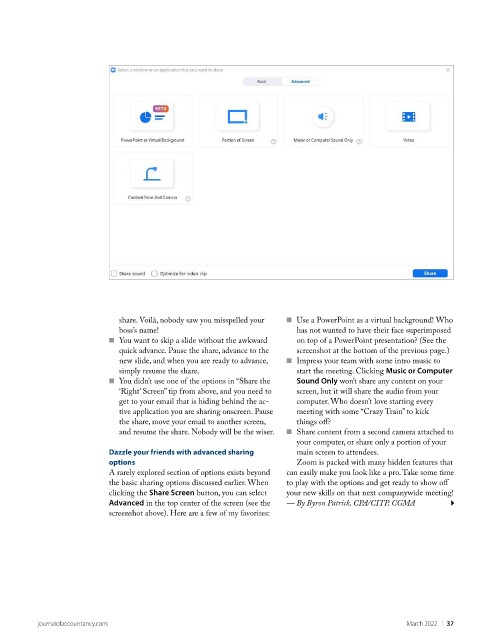
share. Voilà, nobody saw you misspelled your   ■    Use a PowerPoint as a virtual background! Who
                             boss’s name!                              has not wanted to have their face superimposed
                           ■    You want to skip a slide without the awkward   on top of a PowerPoint presentation? (See the
                             quick advance. Pause the share, advance to the   screenshot at the bottom of the previous page.)
                             new slide, and when you are ready to advance,   ■    Impress your team with some intro music to
                             simply resume the share.                  start the meeting. Clicking Music or Computer
                           ■    You didn’t use one of the options in “Share the   Sound Only won’t share any content on your
                             ‘Right’ Screen” tip from above, and you need to   screen, but it will share the audio from your
                             get to your email that is hiding behind the ac-  computer. Who doesn’t love starting every
                             tive application you are sharing onscreen. Pause   meeting with some “Crazy Train” to kick
                             the share, move your email to another screen,   things off?
                             and resume the share. Nobody will be the wiser.  ■    Share content from a second camera attached to
                                                                       your computer, or share only a portion of your
                           Dazzle your friends with advanced sharing   main screen to attendees.
                           options                                     Zoom is packed with many hidden features that
                           A rarely explored section of options exists beyond   can easily make you look like a pro. Take some time
                           the basic sharing options discussed earlier. When   to play with the options and get ready to show off
                           clicking the Share Screen button, you can select   your new skills on that next companywide meeting!
                           Advanced in the top center of the screen (see the   — By Byron Patrick, CPA/CITP, CGMA
                           screenshot above). Here are a few of my favorites:


          journalofaccountancy.com                                                               March 2022    |   37

