


Page 533 - Divyank Tyagi
P. 533
|
                                                           using extended Modeling teChniques for BasiC Walls    499


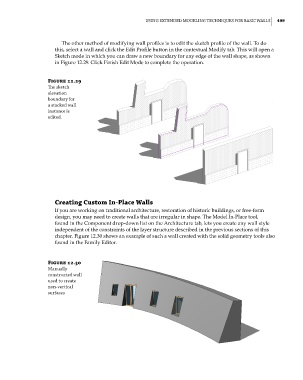
                             The other method of modifying wall profiles is to edit the sketch profile of the wall. To do
                           this, select a wall and click the Edit Profile button in the contextual Modify tab. This will open a
                           Sketch mode in which you can draw a new boundary for any edge of the wall shape, as shown
                           in Figure 12.29. Click Finish Edit Mode to complete the operation.


                        Figure 12.29
                        The sketch
                        elevation
                        boundary for
                        a stacked wall
                        instance is
                        edited.


                           Creating Custom In-Place Walls
                           If you are working on traditional architecture, restoration of historic buildings, or free-form
                           design, you may need to create walls that are irregular in shape. The Model In-Place tool,
                           found in the Component drop-down list on the Architecture tab, lets you create any wall style
                           independent of the constraints of the layer structure described in the previous sections of this
                           chapter. Figure 12.30 shows an example of such a wall created with the solid geometry tools also
                           found in the Family Editor.


                        Figure 12.30
                        Manually
                        constructed wall
                        used to create
                        non-vertical
                        surfaces


          c12.indd   499                                                                             5/3/2014   11:12:49 AM

