


Page 531 - Divyank Tyagi
P. 531
|
                                                           using extended Modeling teChniques for BasiC Walls    497


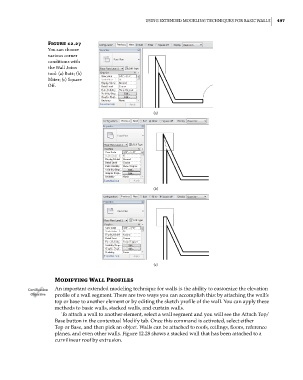
                        Figure 12.27
                        You can choose
                        various corner
                        conditions with
                        the Wall Joins
                        tool: (a) Butt; (b)
                        Miter; (c) square
                        off.


                                                             (a)


                                                             (b)


                                                             (c)

                           Modifying Wall Profiles
                 Certification  An important extended modeling technique for walls is the ability to customize the elevation
                  Objective  profile of a wall segment. There are two ways you can accomplish this: by attaching the wall’s
                           top or base to another element or by editing the sketch profile of the wall. You can apply these
                           methods to basic walls, stacked walls, and curtain walls.
                             To attach a wall to another element, select a wall segment and you will see the Attach Top/
                           Base button in the contextual Modify tab. Once this command is activated, select either
                           Top or Base, and then pick an object. Walls can be attached to roofs, ceilings, floors, reference
                           planes, and even other walls. Figure 12.28 shows a stacked wall that has been attached to a
                           curvilinear roof by extrusion.


          c12.indd   497                                                                             5/3/2014   11:12:47 AM

