


Page 532 - Divyank Tyagi
P. 532
498   |  ChaPTER  12  Creating Walls and Curtain Walls


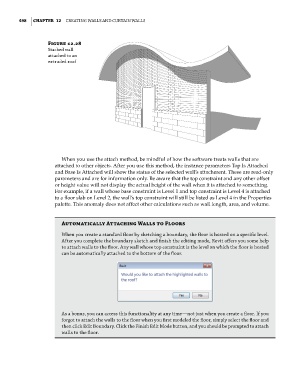
                        Figure 12.28
                        stacked wall
                        attached to an
                        extruded roof


                             When you use the attach method, be mindful of how the software treats walls that are
                           attached to other objects. After you use this method, the instance parameters Top Is Attached
                           and Base Is Attached will show the status of the selected wall’s attachment. These are read-only
                           parameters and are for information only. Be aware that the top constraint and any other offset
                           or height value will not display the actual height of the wall when it is attached to something.
                           For example, if a wall whose base constraint is Level 1 and top constraint is Level 4 is attached
                           to a floor slab on Level 2, the wall’s top constraint will still be listed as Level 4 in the Properties
                           palette. This anomaly does not affect other calculations such as wall length, area, and volume.


                             automatically attaching Walls to Floors

                             When you create a standard floor by sketching a boundary, the floor is hosted on a specific level.
                             after you complete the boundary sketch and finish the editing mode, revit offers you some help
                             to attach walls to the floor. any wall whose top constraint is the level on which the floor is hosted
                             can be automatically attached to the bottom of the floor.


                             as a bonus, you can access this functionality at any time—not just when you create a floor. if you
                             forgot to attach the walls to the floor when you first modeled the floor, simply select the floor and
                             then click edit Boundary. Click the finish edit Mode button, and you should be prompted to attach
                             walls to the floor.


          c12.indd   498                                                                             5/3/2014   11:12:48 AM

