


Page 86 - Divyank Tyagi
P. 86
52   |  ChAPter  2  Applying the principles of the User interfAce And project orgAnizAtion


                           Creating Floor Plans and Ceiling Plans
                           As you learned in the section “Creating and Duplicating Levels” previously in this chapter,
                           when you create a level in an elevation or section view, you have the option to create a plan view
                           for that level in the Options bar. If you have levels without corresponding plan views, you can
                           also use the Plan Views tool from the ribbon to create a plan view.
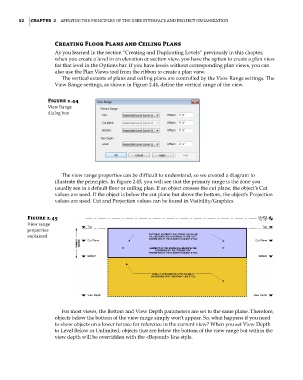
                             The vertical extents of plans and ceiling plans are controlled by the View Range settings. The
                           View Range settings, as shown in Figure 2.44, define the vertical range of the view.


                        Figure 2.44
                        View range
                        dialog box


                             The view range properties can be difficult to understand, so we created a diagram to
                           illustrate the principles. In Figure 2.45, you will see that the primary range is the zone you
                           usually see in a default floor or ceiling plan. If an object crosses the cut plane, the object’s Cut
                           values are used. If the object is below the cut plane but above the bottom, the object’s Projection
                           values are used. Cut and Projection values can be found in Visibility/Graphics.

                 Figure 2.45
                 View range
                 properties
                 explained


                             For most views, the Bottom and View Depth parameters are set to the same plane. Therefore,
                           objects below the bottom of the view range simply won’t appear. So, what happens if you need
                           to show objects on a lower terrace for reference in the current view? When you set View Depth
                           to Level Below or Unlimited, objects that are below the bottom of the view range but within the
                           view depth will be overridden with the <Beyond> line style.


          c02.indd   52                                                                              5/3/2014   10:32:11 AM

