


Page 183 - Handout Computer Network.
P. 183
Computer Network                                                             2026


            • To understand address 3️, recall that the BSS (consisting of the AP and wireless stations) is part
            of a subnet, and that this subnet connects to other subnets via some router interface. Address 3
            contains the MAC address of this router interface.


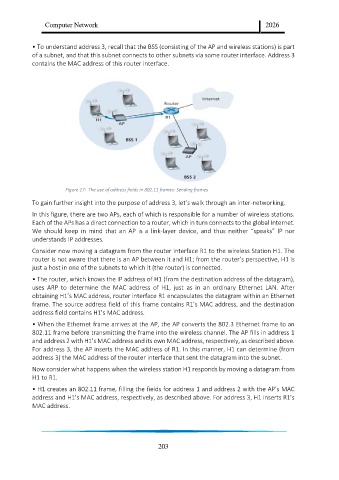
                        Figure 17:  The use of address fields in 802.11 frames: Sending frames

            To gain further insight into the purpose of address 3️, let’s walk through an inter-networking.
            In this figure, there are two APs, each of which is responsible for a number of wireless stations.
            Each of the APs has a direct connection to a router, which in turn connects to the global Internet.
            We  should  keep  in  mind  that  an  AP  is  a  link-layer  device,  and  thus  neither  “speaks”  IP  nor
            understands IP addresses.
            Consider now moving a datagram from the router interface R1 to the wireless Station H1. The
            router is not aware that there is an AP between it and H1; from the router’s perspective, H1 is
            just a host in one of the subnets to which it (the router) is connected.
            • The router, which knows the IP address of H1 (from the destination address of the datagram),
            uses  ARP  to  determine  the  MAC  address  of  H1,  just  as  in  an  ordinary  Ethernet  LAN.  After
            obtaining H1’s MAC address, router interface R1 encapsulates the datagram within an Ethernet
            frame. The source address field of this frame contains R1’s MAC address, and the destination
            address field contains H1’s MAC address.
            • When the Ethernet frame arrives at the AP, the AP converts the 802.3️ Ethernet frame to an
            802.11 frame before transmitting the frame into the wireless channel. The AP fills in address 1
            and address 2 with H1’s MAC address and its own MAC address, respectively, as described above.
            For address 3, the AP inserts the MAC address of R1. In this manner, H1 can determine (from
            address 3) the MAC address of the router interface that sent the datagram into the subnet.
            Now consider what happens when the wireless station H1 responds by moving a datagram from
            H1 to R1.

            • H1 creates an 802.11 frame, filling the fields for address 1 and address 2 with the AP’s MAC
            address and H1’s MAC address, respectively, as described above. For address 3️, H1 inserts R1’s
            MAC address.


                                                         203

