


Page 105 - 3E User Manual- updated 3-2018
P. 105
Matter Inquiry


            •  If desired, export to Excel using the part with an arrow in it.

            •  Print.
            •  Maximize using the icon with four arrows pointing outward (if maximizing, select the same icon to minimize).
            •  Closing out of the part by selecting X is NOT recommend as once the part is closed, the part does not return
               when returning to this process!
                   o  One part on this screen is called Trust Balances. S-E-A does not use Trust accounts, so X this part.
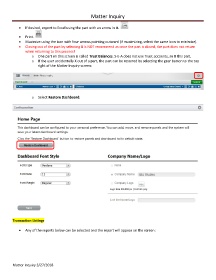
                   o  If the user accidentally X out of a part, the part can be restored by selecting the gear button to the top
                       right of the Matter Inquiry screen:


                   o  Select Restore Dashboard:


        Transaction Listings

            •  Any of the reports below can be selected and the report will appear on the screen:


        Matter Inquiry 3/27/2018

