


Page 105 - Computer Graphics Handout
P. 105
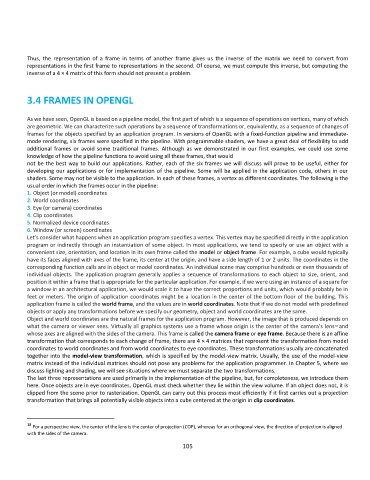
Thus,  the  representation  of  a  frame  in  terms  of  another  frame  gives  us  the  inverse  of  the  matrix  we  need  to  convert  from
          representations in the first frame to representations in the second. Of course, we must compute this inverse, but computing the
          inverse of a 4 × 4 matrix of this form should not present a problem.


          3.4 FRAMES IN OPENGL


          As we have seen, OpenGL is based on a pipeline model, the first part of which is a sequence of operations on vertices, many of which
          are geometric. We can characterize such operations by a sequence of transformations or, equivalently, as a sequence of changes of
          frames for the objects specified by an application program. In versions of OpenGL with a fixed-function pipeline and immediate-
          mode rendering, six frames were specified in the pipeline. With programmable shaders, we have a great deal of flexibility to add
          additional  frames  or  avoid  some  traditional  frames.  Although  as  we  demonstrated  in  our  first  examples,  we  could  use  some
          knowledge of how the pipeline functions to avoid using all these frames, that would
          not be the best way to build our applications. Rather, each of the six frames we will discuss will prove to be useful, either for
          developing our applications or for implementation of the pipeline. Some will be applied in the application code, others in our
          shaders. Some may not be visible to the application. In each of these frames, a vertex as different coordinates. The following is the
          usual order in which the frames occur in the pipeline:
          1. Object (or model) coordinates
          2. World coordinates
          3. Eye (or camera) coordinates
          4. Clip coordinates
          5. Normalized device coordinates
          6. Window (or screen) coordinates
          Let’s consider what happens when an application program specifies a vertex. This vertex may be specified directly in the application
          program or indirectly through an instantiation of some object. In most applications, we tend to specify or use an  object with a
          convenient size, orientation, and location in its own frame called the model or object frame. For example, a cube would typically
          have its faces aligned with axes of the frame, its center at the origin, and have a side length of 1 or 2 units. The coordinates in the
          corresponding function calls are in object or model coordinates. An individual scene may comprise hundreds or even thousands of
          individual objects. The application program generally applies a sequence of transformations to each object to size, orient, and
          position it within a frame that is appropriate for the particular application. For example, if we were using an instance of a square for
          a window in an architectural application, we would scale it to have the correct proportions and units, which would probably be in
          feet or meters. The origin of application coordinates might be a location in the center of the bottom floor of the building. This
          application frame is called the world frame, and the values are in world coordinates. Note that if we do not model with predefined
          objects or apply any transformations before we specify our geometry, object and world coordinates are the same.
          Object and world coordinates are the natural frames for the application program. However, the image that is produced depends on
          what the camera or viewer sees. Virtually all graphics systems use a frame whose origin is the center of the camera’s lens  and
                                                                                                                18
          whose axes are aligned with the sides of the camera. This frame is called the camera frame or eye frame. Because there is an affine
          transformation that corresponds to each change of frame, there are 4 × 4 matrices that represent the transformation from model
          coordinates to world coordinates and from world coordinates to eye coordinates. These transformations usually are concatenated
          together into the model-view transformation, which is specified by the model-view matrix. Usually, the use of the model-view
          matrix instead of the individual matrices should not pose any problems for the application programmer. In Chapter 5, where we
          discuss lighting and shading, we will see situations where we must separate the two transformations.
          The last three representations are used primarily in the implementation of the pipeline, but, for completeness, we introduce them
          here. Once objects are in eye coordinates, OpenGL must check whether they lie within the view volume. If an object does not, it is
          clipped from the scene prior to rasterization. OpenGL can carry out this process most efficiently if it first carries out a projection
          transformation that brings all potentially visible objects into a cube centered at the origin in clip coordinates.


          18
            For a perspective view, the center of the lens is the center of projection (COP), whereas for an orthogonal view, the direction of projection is aligned
          with the sides of the camera.
                                                             105

