


Page 110 - Computer Graphics Handout
P. 110
where cube_vertices[i] contains the x, y, z coordinates of the ith vertex in the list. Both of these methods work, but they both fail to
          capture the essence of the cube’s topology, as opposed to the cube’s geometry. If we think of the cube as a polyhedron, we have
          an object—the cube—that is composed of six faces. The faces are each quadrilaterals that meet at vertices; each vertex is shared
          by three faces. In addition, pairs of vertices define edges of the quadrilaterals; each edge is shared by two faces. These statements
          describe the topology of a six-sided polyhedron. All are true, regardless of the location of the vertices—that is, regardless of the
                             19
          geometry of the object .
          Throughout the rest of this book, we will see that there are numerous advantages to building for our objects data structures that
          separate the topology from the geometry. In this example, we use a structure, the vertex list, that is both simple and useful and can
          be expanded later.


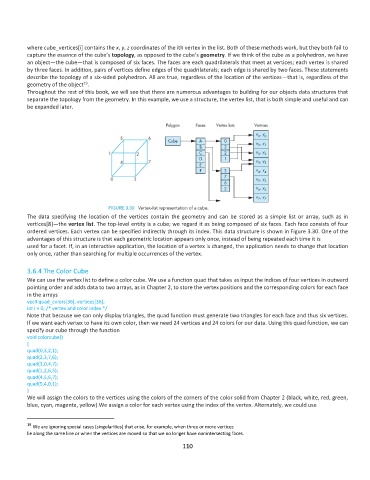
          The  data  specifying  the  location  of  the  vertices  contain  the  geometry  and  can  be  stored  as  a  simple  list  or  array,  such  as  in
          vertices[8]—the vertex list. The top-level entity is a cube; we regard it as being composed of six faces. Each face consists of four
          ordered vertices. Each vertex can be specified indirectly through its index. This data structure is shown in Figure 3.30. One of the
          advantages of this structure is that each geometric location appears only once, instead of being repeated each time it is
          used for a facet. If, in an interactive application, the location of a vertex is changed, the application needs to change that location
          only once, rather than searching for multiple occurrences of the vertex.

          3.6.4 The Color Cube
          We can use the vertex list to define a color cube. We use a function quad that takes as input the indices of four vertices in outward
          pointing order and adds data to two arrays, as in Chapter 2, to store the vertex positions and the corresponding colors for each face
          in the arrays
          vec4 quad_colors[36], vertices[36];
          int i = 0; /* vertex and color index */
          Note that because we can only display triangles, the quad function must generate two triangles for each face and thus six vertices.
          If we want each vertex to have its own color, then we need 24 vertices and 24 colors for our data. Using this quad function, we can
          specify our cube through the function
          void colorcube()
          {
          quad(0,3,2,1);
          quad(2,3,7,6);
          quad(3,0,4,7);
          quad(1,2,6,5);
          quad(4,5,6,7);
          quad(5,4,0,1);
          }
          We will assign the colors to the vertices using the colors of the corners of the color solid from Chapter 2 (black, white, red, green,
          blue, cyan, magenta, yellow).We assign a color for each vertex using the index of the vertex. Alternately, we could use


          19
            We are ignoring special cases (singularities) that arise, for example, when three or more vertices
          lie along the same line or when the vertices are moved so that we no longer have nonintersecting faces.
                                                             110

