


Page 50 - Computer Graphics Handout
P. 50
2.4.2 Polygons in OpenGL


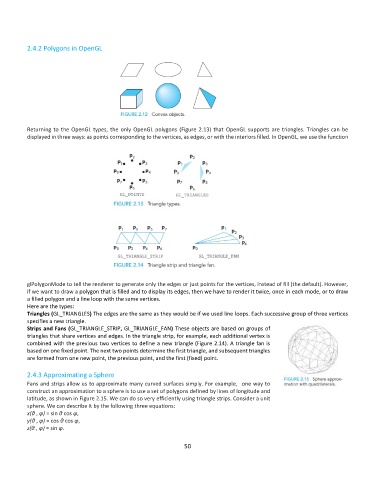
          Returning to the OpenGL types, the only OpenGL polygons (Figure 2.13) that OpenGL supports are triangles. Triangles can be
          displayed in three ways: as points corresponding to the vertices, as edges, or with the interiors filled. In OpenGL, we use the function


          glPolygonMode to tell the renderer to generate only the edges or just points for the vertices, instead of fill (the default). However,
          if we want to draw a polygon that is filled and to display its edges, then we have to render it twice, once in each mode, or to draw
          a filled polygon and a line loop with the same vertices.
          Here are the types:
          Triangles (GL_TRIANGLES) The edges are the same as they would be if we used line loops. Each successive group of three vertices
          specifies a new triangle.
          Strips and Fans (GL_TRIANGLE_STRIP, GL_TRIANGLE_FAN) These objects are based on groups of
          triangles that share vertices and edges. In the triangle strip, for example, each additional vertex is
          combined with the previous two vertices to define a new triangle (Figure 2.14). A triangle fan is
          based on one fixed point. The next two points determine the first triangle, and subsequent triangles
          are formed from one new point, the previous point, and the first (fixed) point.

          2.4.3 Approximating a Sphere
          Fans and strips allow us to approximate many curved surfaces simply. For example,  one way to
          construct an approximation to a sphere is to use a set of polygons defined by lines of longitude and
          latitude, as shown in Figure 2.15. We can do so very efficiently using triangle strips. Consider a unit
          sphere. We can describe it by the following three equations:
          x(θ , φ) = sin θ cos φ,
          y(θ , φ) = cos θ cos φ,
          z(θ , φ) = sin φ.

                                                              50

