


Page 1107 - 2006 HARLEY FLSTCI SERVICE MANUAL
P. 1107
8.35


                                       4
                                 3
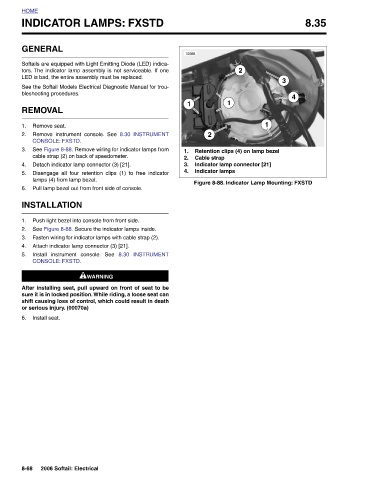
                                                        Retention clips (4) on lamp bezel  Indicator lamp connector [21]
                                                1


                              2                                    Figure 8-88. Indicator Lamp Mounting: FXSTD
                                         1


                                                   2       Cable strap  Indicator lamps


                        10388            1              1.  2.  3.  4.


                                                   8.30 INSTRUMENT See Figure 8-88. Remove wiring for indicator lamps from  Disengage all four retention clips (1) to free indicator  See Figure 8-88. Secure the indicator lamps inside. Fasten wiring for indicator lamps with cable strap (2).  8.30 INSTRUMENT  1WARNING 1WARNING After installing seat, pull upward on front of seat to be sure it is in locked position. While riding, a loose seat can shift causing loss of control, which could result in death
                              tors. The indicator lamp assembly is not serviceable. If one
                            Softails are equipped with Light Emitting Diode (LED) indica-
                                   See the Softail Models Electrical Diagnostic Manual for trou-
               INDICATOR LAMPS: FXSTD


                       GENERAL  LED is bad, the entire assembly must be replaced.  bleshooting procedures.  REMOVAL  Remove seat. Remove instrument console. See   CONSOLE: FXSTD.  cable strap (2) on back of speedometer. Detach indicator lamp connector (3) [21].  lamps (4) from lamp bezel. Pull lamp bezel out from front side of console.  INSTALLATION Push light bezel into console from front side.  Attach indicator lamp connector (3) [21]. Install instrument console. See   CONSOLE: FXSTD.  or serious injury. (00070a)  Install seat.  2006 Softail: Electrical


          HOME                                  1.  2.  3.   4.  5.  6.        1.  2.  3.  4.  5.              6.                                                8-68

