


Page 47 - Computer Basics - Research
P. 47
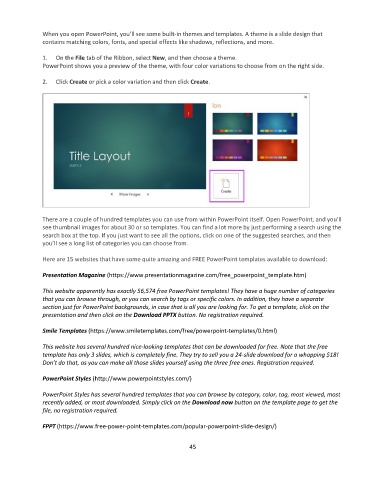
When you open PowerPoint, you’ll see some built-in themes and templates. A theme is a slide design that
               contains matching colors, fonts, and special effects like shadows, reflections, and more.

               1.   On the File tab of the Ribbon, select New, and then choose a theme.
               PowerPoint shows you a preview of the theme, with four color variations to choose from on the right side.

               2.   Click Create or pick a color variation and then click Create.


               There are a couple of hundred templates you can use from within PowerPoint itself. Open PowerPoint, and you’ll
               see thumbnail images for about 30 or so templates. You can find a lot more by just performing a search using the
               search box at the top. If you just want to see all the options, click on one of the suggested searches, and then
               you’ll see a long list of categories you can choose from.

               Here are 15 websites that have some quite amazing and FREE PowerPoint templates available to download:

               Presentation Magazine (https://www.presentationmagazine.com/free_powerpoint_template.htm)

               This website apparently has exactly 56,574 free PowerPoint templates! They have a huge number of categories
               that you can browse through, or you can search by tags or specific colors. In addition, they have a separate
               section just for PowerPoint backgrounds, in case that is all you are looking for. To get a template, click on the
               presentation and then click on the Download PPTX button. No registration required.

               Smile Templates (https://www.smiletemplates.com/free/powerpoint-templates/0.html)

               This website has several hundred nice-looking templates that can be downloaded for free. Note that the free
               template has only 3 slides, which is completely fine. They try to sell you a 24-slide download for a whopping $18!
               Don’t do that, as you can make all those slides yourself using the three free ones. Registration required.

               PowerPoint Styles (http://www.powerpointstyles.com/)

               PowerPoint Styles has several hundred templates that you can browse by category, color, tag, most viewed, most
               recently added, or most downloaded. Simply click on the Download now button on the template page to get the
               file, no registration required.

               FPPT (https://www.free-power-point-templates.com/popular-powerpoint-slide-design/)

                                                                 45

