


Page 511 - JoFA_2022
P. 511
TECHNOLOGY


                          Running reports


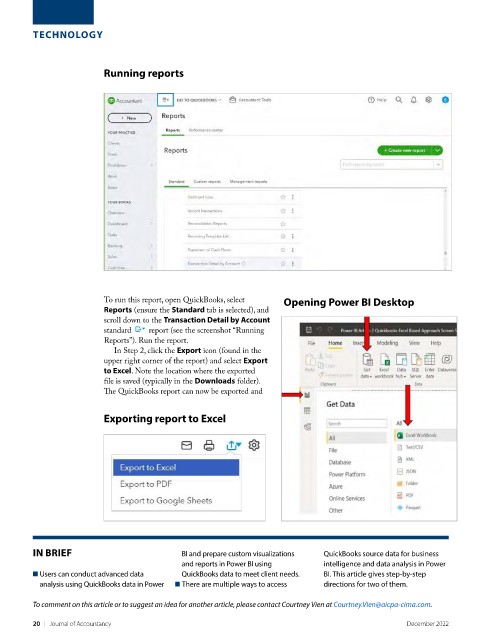
                          To run this report, open QuickBooks, select    Opening Power BI Desktop
                          Reports (ensure the Standard tab is selected), and
                          scroll down to the Transaction Detail by Account
                          standard    report (see the screenshot “Running
                          Reports”). Run the report.
                            In Step 2, click the Export icon (found in the
                          upper right corner of the report) and select Export
                          to Excel. Note the location where the exported
                          file is saved (typically in the Downloads folder).
                          The QuickBooks report can now be exported and


                          Exporting report to Excel


         IN BRIEF                           BI and prepare custom visualizations   QuickBooks source data for business
                                            and reports in Power BI using     intelligence and data analysis in Power
         ■  Users can conduct advanced data   QuickBooks data to meet client needs.  BI. This article gives step-by-step
          analysis using QuickBooks data in Power   ■  There are multiple ways to access   directions for two of them.
         To comment on this article or to suggest an idea for another article, please contact Courtney Vien at Courtney.Vien@aicpa-cima.com.


         20    |   Journal of Accountancy                                                        December 2022

