


Page 515 - JoFA_2022
P. 515
TECHNOLOGY


         Removing the Total and Headers rows


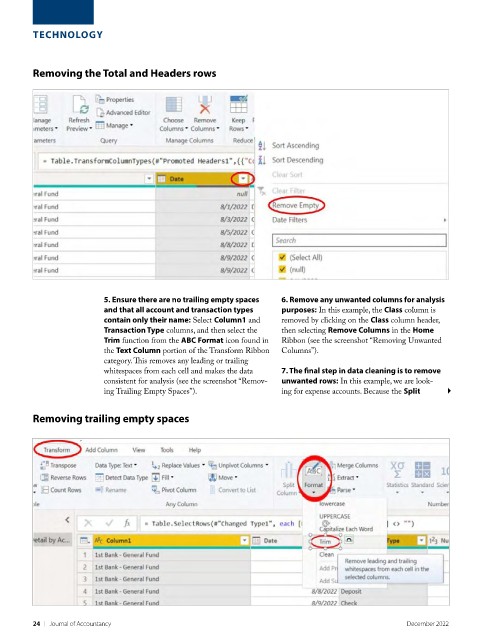
                          5. Ensure there are no trailing empty spaces   6. Remove any unwanted columns for analysis
                          and that all account and transaction types   purposes: In this example, the Class column is
                          contain only their name: Select Column1 and   removed by clicking on the Class column header,
                          Transaction Type columns, and then select the   then selecting Remove Columns in the Home
                          Trim function from the ABC Format icon found in   Ribbon (see the screenshot “Removing Unwanted
                          the Text Column portion of the Transform Ribbon   Columns”).
                          category. This removes any leading or trailing
                          whitespaces from each cell and makes the data   7. The final step in data cleaning is to remove
                          consistent for analysis (see the screenshot “Remov-  unwanted rows: In this example, we are look-
                          ing Trailing Empty Spaces”).              ing for expense accounts. Because the Split


         Removing trailing empty spaces


         24    |   Journal of Accountancy                                                        December 2022

