


Page 513 - JoFA_2022
P. 513
TECHNOLOGY


         When a client needs more                                   to be cleaned and formatted before loading into
                                                                      Data from the Excel file appears. The data needs

         analytical capability than                                 Power BI. Click on the Transform Data button, as
                                                                    indicated by the bottom red arrow in the “Transac-
                                                                    tion Detail by Account” screenshot. The Power
         QuickBooks can provide,                                    Query Editor (native to Power BI) opens to allow
                                                                    the transformation of the data.
                                                                      The Power Query tool can be used in Excel to
         accountants can use                                        easily record steps taken to transform and format
                                                                    the data in preparation for loading into Power BI.
                                                                    (It can also be saved and reused to rerun the exact
         additional technological                                   steps upon refresh of the QuickBooks report.) To
                                                                    prepare the data, take the following steps:
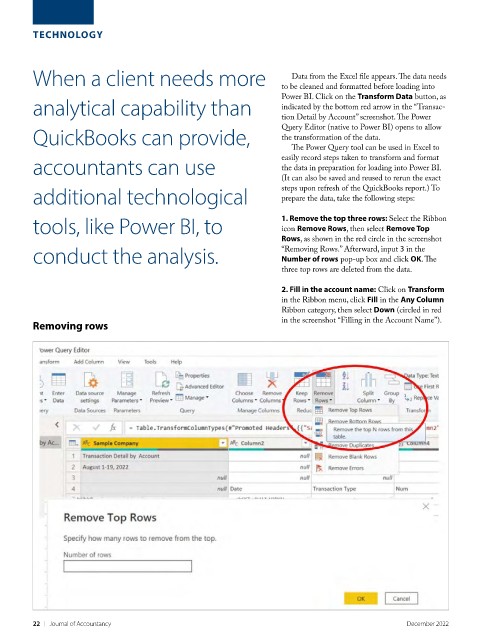
         tools, like Power BI, to                                   1. Remove the top three rows: Select the Ribbon
                                                                    icon Remove Rows, then select Remove Top
                                                                    Rows, as shown in the red circle in the screenshot
         conduct the analysis.                                      “Removing Rows.” Afterward, input 3 in the
                                                                    Number of rows pop-up box and click OK. The
                                                                    three top rows are deleted from the data.

                                                                    2. Fill in the account name: Click on Transform
                                                                    in the Ribbon menu, click Fill in the Any Column
                                                                    Ribbon category, then select Down (circled in red
         Removing rows                                              in the screenshot “Filling in the Account Name”).


         22    |   Journal of Accountancy                                                        December 2022

