


Page 501 - Divyank Tyagi
P. 501
|
                                                                 unDeRstanDing PHoto-RealistiC Visualization    467


                            11.  From the Manage tab in the ribbon, click Object Styles. In the Object Styles dialog box,
                                click the New button and create a new subcategory named Lens. Make sure that it is a
                                subcategory of Lighting Fixtures. Click OK to close the Object Styles dialog box.
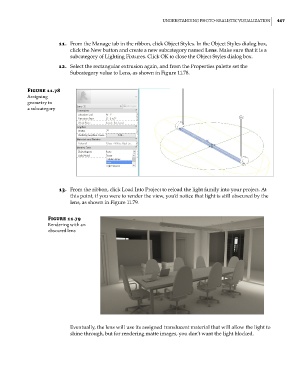
                            12.  Select the rectangular extrusion again, and from the Properties palette set the
                                Subcategory value to Lens, as shown in Figure 11.78.


                 Figure 11.78
                 assigning
                 geometry to
                 a subcategory


                            13.  From the ribbon, click Load Into Project to reload the light family into your project. At
                                this point, if you were to render the view, you’d notice that light is still obscured by the
                                lens, as shown in Figure 11.79.

                        Figure 11.79
                        Rendering with an
                        obscured lens


                                Eventually, the lens will use its assigned translucent material that will allow the light to
                                shine through, but for rendering matte images, you don’t want the light blocked.


          c11.indd   467                                                                             5/3/2014   11:07:38 AM

