


Page 502 - Divyank Tyagi
P. 502
468   |  ChaptER  11  Visualization


                            14.  Reload the light into the project and open the Visibility/Graphic Overrides dialog box for
                                the interior camera view. Expand the Lighting Fixtures category and uncheck the Lens
                                subcategory.
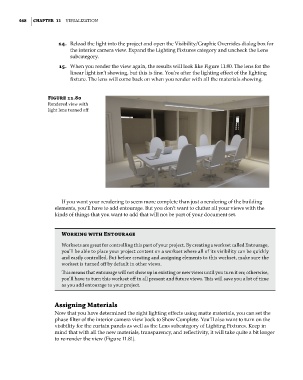
                            15.  When you render the view again, the results will look like Figure 11.80. The lens for the
                                linear light isn’t showing, but this is fine. You’re after the lighting effect of the lighting
                                fixture. The lens will come back on when you render with all the materials showing.


                        Figure 11.80
                        Rendered view with
                        light lens turned off


                             If you want your rendering to seem more complete than just a rendering of the building
                           elements, you’ll have to add entourage. But you don’t want to clutter all your views with the
                           kinds of things that you want to add that will not be part of your document set.


                             Working with Entourage
                             Worksets are great for controlling this part of your project. By creating a workset called entourage,
                             you’ll be able to place your project content on a workset where all of its visibility can be quickly
                             and easily controlled. But before creating and assigning elements to this workset, make sure the
                             workset is turned off by default in other views.
                             This means that entourage will not show up in existing or new views until you turn it on; otherwise,
                             you’ll have to turn this workset off in all present and future views. This will save you a lot of time
                             as you add entourage to your project.


                           assigning Materials
                           Now that you have determined the right lighting effects using matte materials, you can set the
                           phase filter of the interior camera view back to Show Complete. You’ll also want to turn on the
                           visibility for the curtain panels as well as the Lens subcategory of Lighting Fixtures. Keep in
                           mind that with all the new materials, transparency, and reflectivity, it will take quite a bit longer
                           to re-render the view (Figure 11.81).


          c11.indd   468                                                                             5/3/2014   11:07:39 AM

